Billing Setting
Overview
The Billing page sets how your site bills customers: the default billing cycle and grace/deactivation rules, invoice/receipt/quotation numbering and print templates, your tax registration and bank/UPI details printed on invoices, and the reusable libraries of Billing Profiles and Taxes.
Navigation: Config → Billing
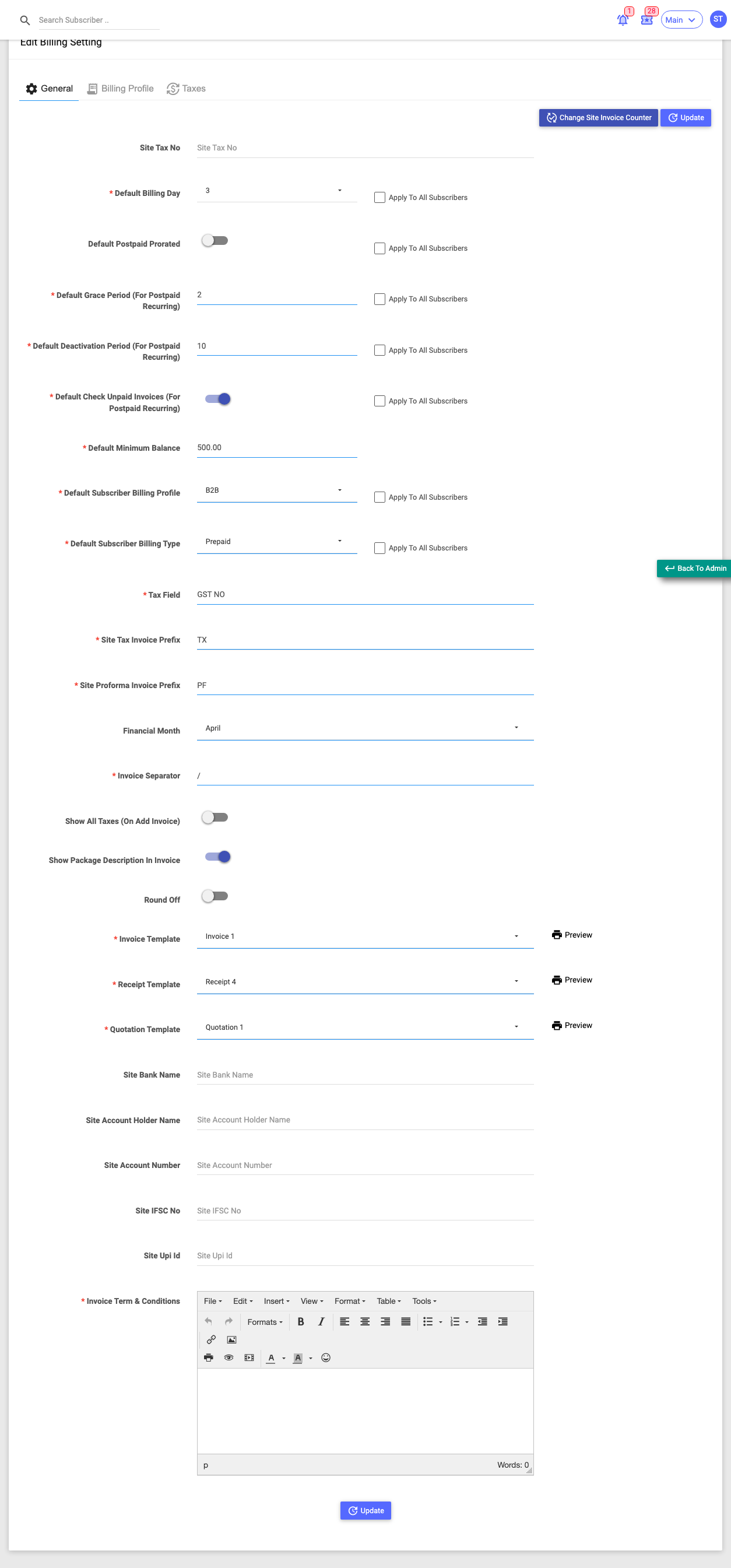
The page has three tabs: General, Billing Profile, and Taxes. Each is explained below.
General tab
Site-wide billing defaults. Many have an Apply To All Subscribers checkbox.
| Field | What it does |
|---|---|
| Site Tax No | Your tax/GST registration number, printed on invoices. |
| Default Billing Day | Day of month (1–28) billing runs. |
| Default Postpaid Prorated | Prorate postpaid charges for partial periods. |
| Default Grace Period | Days after expiry before service is cut. |
| Default Deactivation Period | Days after which an unpaid subscriber is deactivated. |
| Default Check Unpaid Invoices | Check for unpaid invoices / a minimum balance before recharge; reveals Default Minimum Balance. |
| Default Subscriber Billing Profile | The billing profile new subscribers get. |
| Default Subscriber Billing Type | Prepaid or Postpaid Recurring. |
| Tax Field | The tax line label shown on invoices (e.g. "GST NO"). |
| Site Tax / Proforma Invoice Prefix | Text prefixed to invoice numbers. |
| Financial Month | The month your financial year starts (drives numbering resets). |
| Invoice Separator | The separator used inside invoice numbers. |
| Show All Taxes / Show Package Description / Round Off | Invoice display options. |
| Invoice / Receipt / Quotation Template | The printed layouts, each with a Preview. |
| Site Bank / Account / IFSC / UPI details | Printed on invoices so customers can pay you. |
| Invoice Terms & Conditions | Text printed at the bottom of invoices. |
Change Site Invoice Counter (top) opens a dialog to manually set the site's tax/proforma counters.
:::caution "Apply To All Subscribers" overwrites everyone Ticking one of these checkboxes changes that setting on every existing subscriber, not just new ones. :::
Billing Profile tab
A billing profile bundles a set of taxes and invoice-numbering rules that you can assign to subscribers. The tab lists each profile — Status, Name, Description, number of Taxes, Financial Month, Tax/Proforma invoice prefixes and their counters — with a Search and Filter.
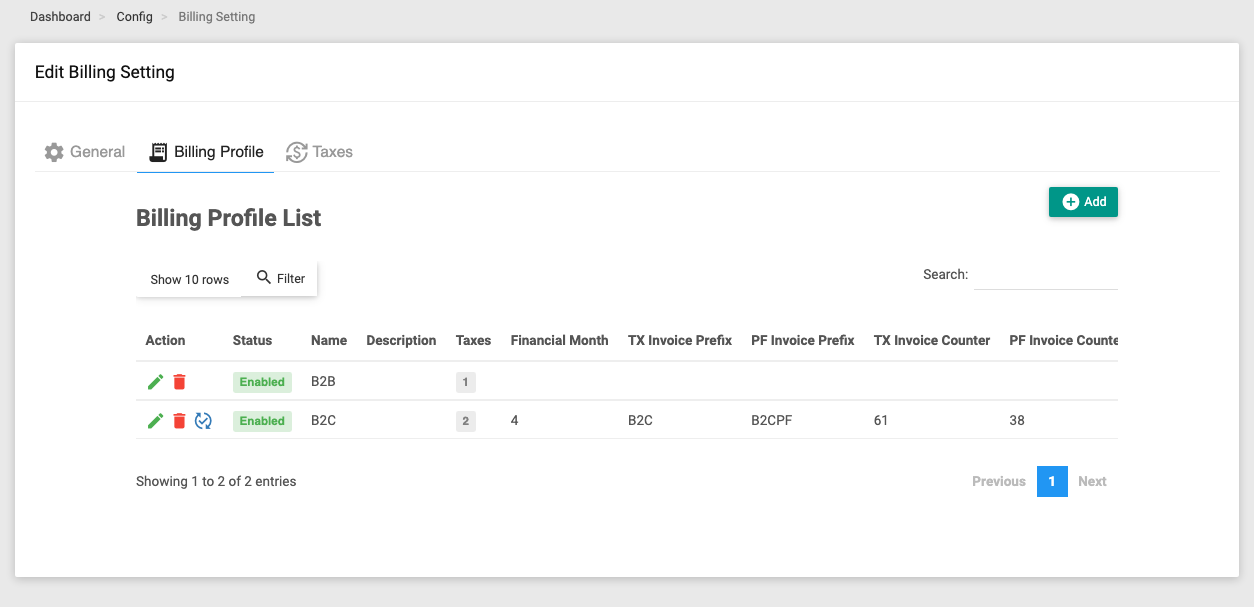
Add opens a modal:
- Enabled, Name, Description.
- Taxes — which taxes this profile applies.
- Invoice No Counter — Separate (its own numbering, prefixes and financial month), Main (uses the site counter), or Parent Billing (uses the parent's numbering; bank details and terms then come from the parent).
- (When Separate) Financial Month, Invoice Separator, Tax/Proforma Prefix.
- Proforma Auto Convert Time — how long before a proforma auto-converts to a tax invoice.
- Invoice Rollback Time — the window in which an invoice can be rolled back.
Per-row Edit and Delete; "Separate"-numbered profiles also get a Change Billing Invoice Counter action.
Taxes tab
The library of taxes you can attach to billing profiles. The tab lists each tax — Name, Description, Percentage and Status.
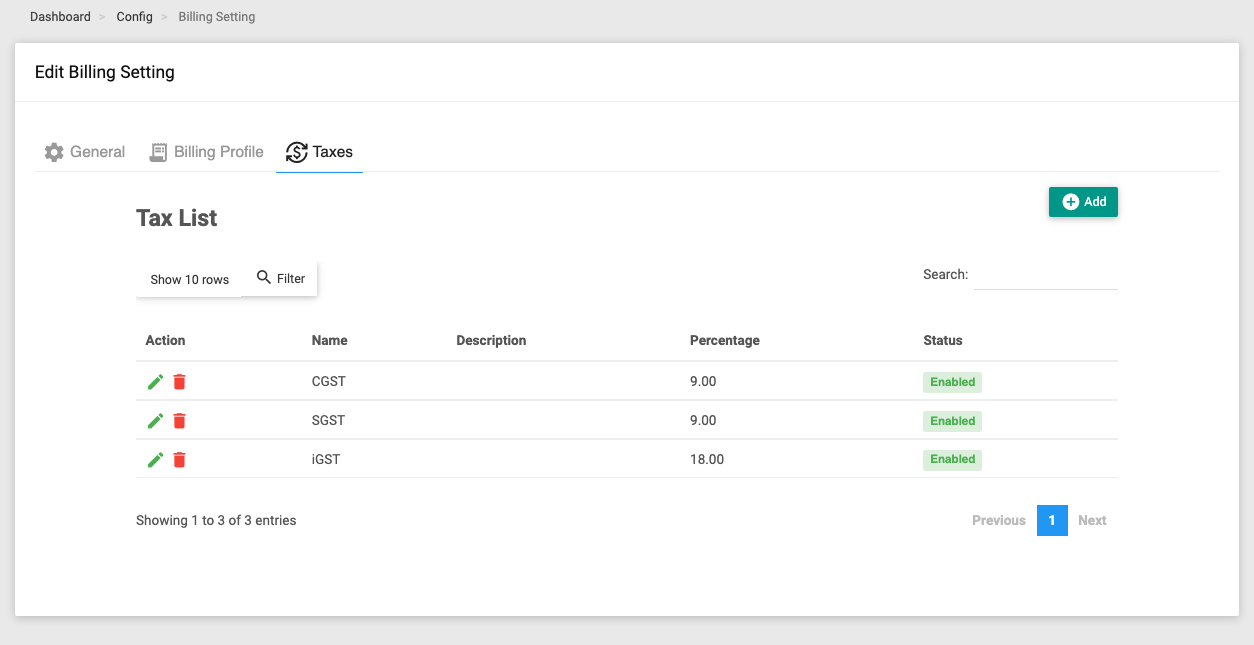
Add opens a modal with Name, Description, Percentage and Enabled. Per-row Edit and Delete.
Taxes defined here don't apply on their own — they take effect once you attach them to a Billing Profile, which is then assigned to subscribers.