Integrations
These Config pages connect the platform to external systems and hardware. Which of them appear depends on your add-on modules and business model.
Every field described here that holds a key, token or login is a credential — keep it private, and only regenerate a key when you're ready to update wherever it's used. In this documentation such values are hidden.
CATV OLT
Menu: Config → CATV OLT (only when the CATV module is enabled)
Registers the Cable-TV / GPON OLT devices the system connects to for CATV/FTTH management, so the platform can log into each OLT to provision and manage subscriber ONUs.
The page lists your OLTs (Name, Type, Host/IP, Telnet/SSH ports, status) with Add CATV OLT, and per-row Edit/Delete. The Add/Edit modal has:
- Name, Description.
- Host/IP — the OLT's network address.
- Username, Password, Secret — the device login and privileged-mode secret (masked). (Credentials.)
- Telnet Port, SSH Port.
- Type — your OLT model/vendor (get this from your hardware vendor).
- Enabled toggle, and a Remark for the audit log.
This page appears only when the CATV module is enabled for your site. Getting the Type, ports or credentials wrong will silently prevent provisioning.
ACS (TR-069)
Menu: Config → ACS (TR-069)
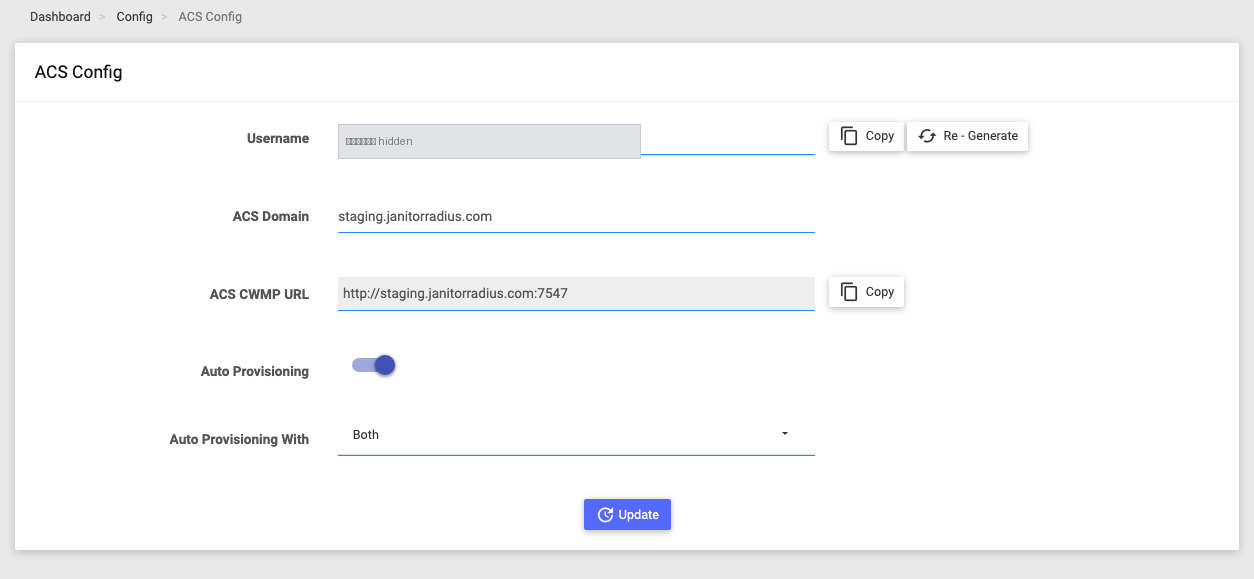
Configures the built-in TR-069 Auto Configuration Server (ACS) that customer routers/CPE connect to for remote management, so devices "phone home" and can be auto-provisioned.
| Field | What it does |
|---|---|
| Username | The connection account CPE devices present to the ACS. Copy it, or Re-Generate a fresh one. (A credential.) |
| ACS Domain | The hostname CPE devices use to reach the ACS. |
| ACS CWMP URL | Read-only, auto-built endpoint you hand out / push to devices (with a Copy button). |
| Auto Provisioning | When on, newly-seen devices are provisioned automatically. |
| Auto Provisioning With | How a device is matched: Both (MAC + serial), Mac Address, or Serial Number. |
Click Update to save.
Changing the username means every CPE must be updated to the new value, or they can't connect — regenerate with care. The related device management screens live in the ACS (TR-069) module.
Tally
Menu: Config → Tally
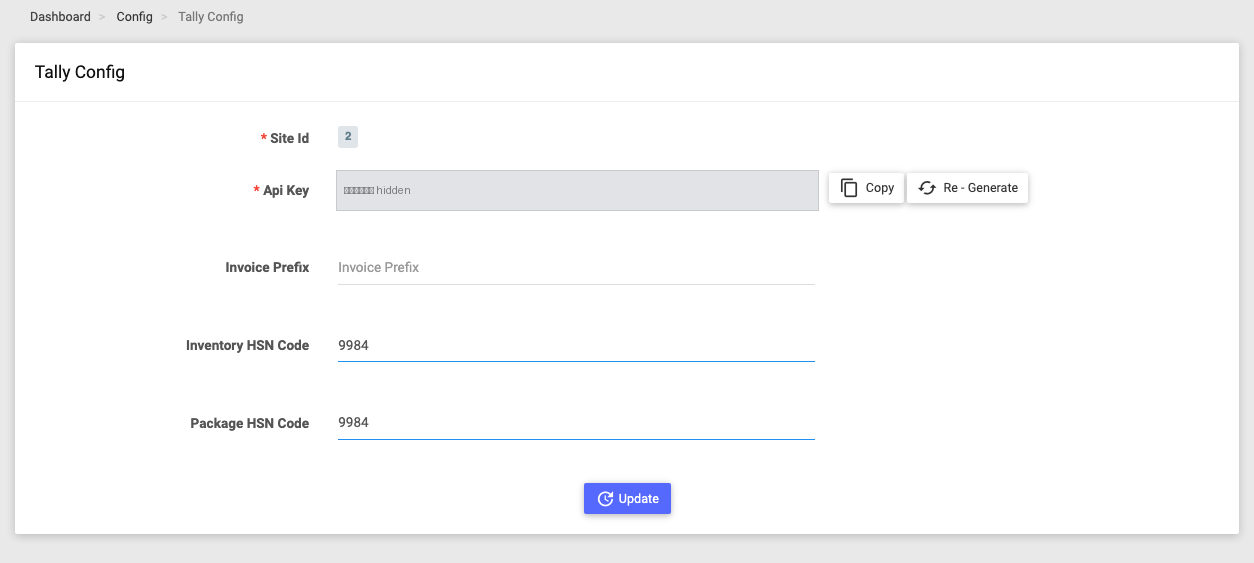
Sets up the integration that lets Tally accounting software pull billing and inventory data from the platform via API.
| Field | What it does |
|---|---|
| Site Id | Which site this connection is for (read-only). |
| Api Key | The key the Tally connector uses to authenticate. Copy or Re-Generate. (A credential.) |
| Invoice Prefix | Prefix applied to invoice numbers exported to Tally. |
| Inventory HSN Code / Package HSN Code | Default HSN (India GST) codes for inventory items and subscription lines sent to Tally. |
Click Update to save. (Multi-site accounts also get an Allowed Sites selector.)
Regenerating the API key invalidates the old one, so the Tally-side connector must be updated with the new key.
OTT
Menu: Config → OTT (streaming business type only)
Connects the platform to third-party OTT (streaming) providers so you can bundle/activate OTT subscriptions for your broadband customers. Supported providers: PlayBoxTV, OTTplay, Watcho.
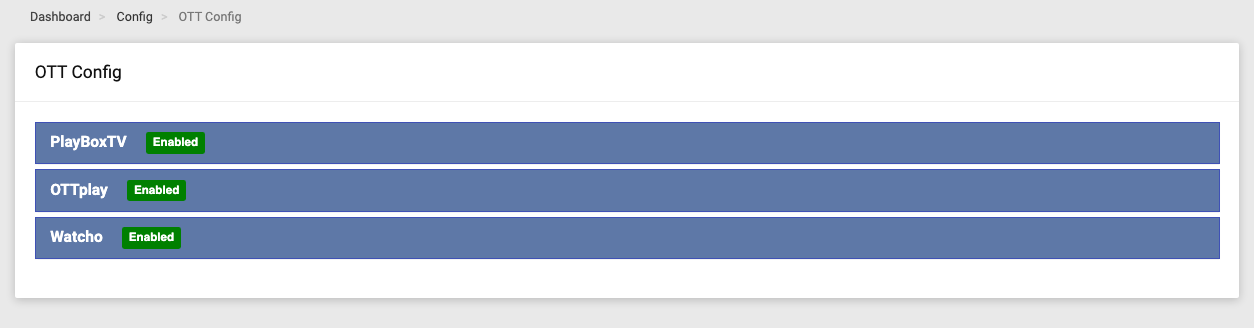
The page is an accordion with one panel per provider (a green Enabled badge shows active ones). Each panel has an Enabled toggle that reveals that provider's credential fields (API keys / login IDs / secret keys specific to the provider), an Update button, and a Check Balance button that shows the provider account balance.
Only turn a provider on once its credentials are entered — the fields are hidden while it's off. This page is available only for the streaming business type.
IPTV
Menu: Config → IPTV (streaming business type only)
Connects the platform to an IPTV provider so you can provision IPTV/live-TV to subscribers. Currently supports ESTO.

Expand the provider panel, turn Enabled on to reveal its fields (username, key, and LCO ID), and click Update.
Like OTT, this page is available only for the streaming business type.
LQoS
Menu: Config → LQoS
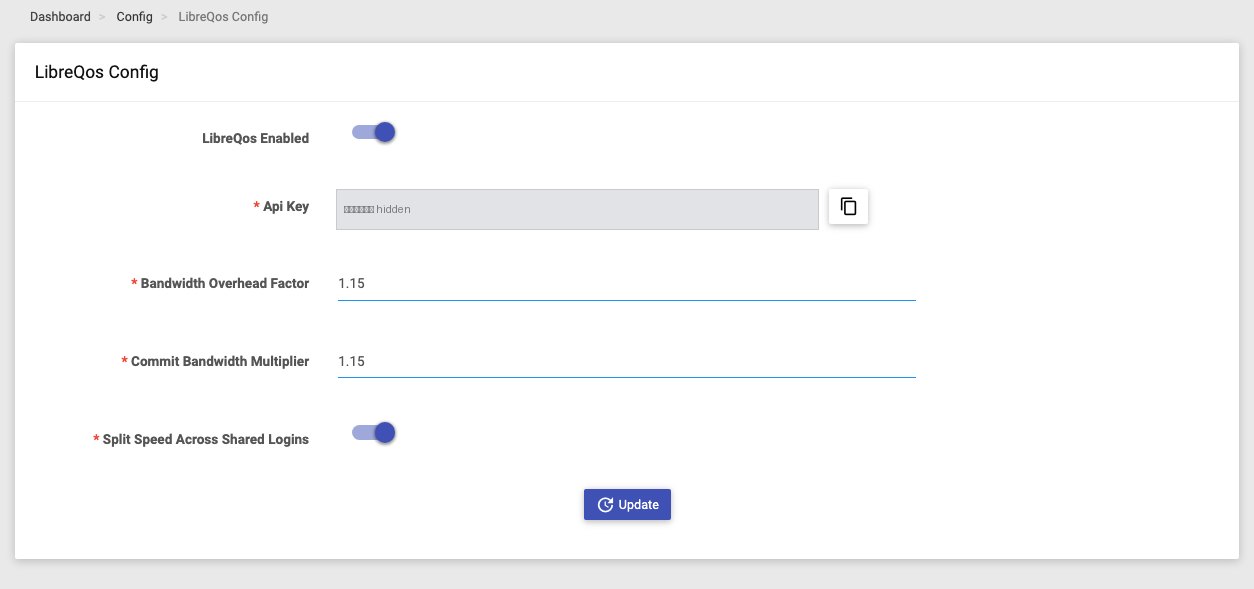
Configures the LibreQoS integration — a smart bandwidth/QoS shaping engine — so the platform can push subscriber speed plans to a LibreQoS shaper for fair, per-customer bandwidth control.
| Field | What it does |
|---|---|
| LibreQos Enabled | Master toggle for the integration. |
| Api Key | The key the LibreQoS shaper uses to authenticate, with a Copy button (read-only). (A credential.) |
| Bandwidth Overhead Factor | A multiplier applied to provisioned bandwidth to account for network overhead. |
| Commit Bandwidth Multiplier | Sets the guaranteed-minimum bandwidth relative to the plan rate. |
| Split Speed Across Shared Logins | When on, an account's speed is divided across its simultaneous logins. |
Click Update to save.
Turning LibreQos Enabled off also switches off LQoS on all your zones and NAS devices — it disengages shaping everywhere on the site, not just on this page.