Site Setting
Overview
The Site page is your business's master profile. It controls the identity shown on invoices, receipts, vouchers and the customer website; the region settings (country, currency, timezone) that drive money and date formatting everywhere in the portal; global defaults for how subscribers recharge and are billed; and the look and content of your public customer website.
Navigation: Config → Site
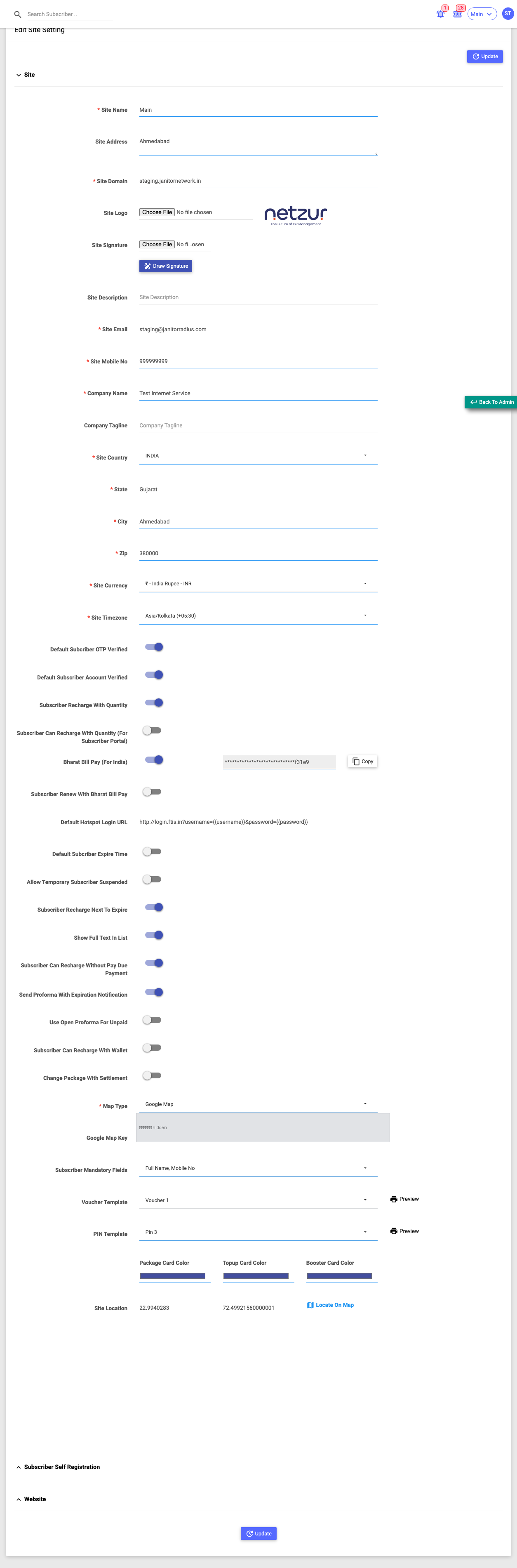
The page is one long form with three collapsible panels — Site (open by default), Subscriber Self Registration, and Website — with an Update button at the top and bottom.
Site panel
Identity
| Field | What it does |
|---|---|
| Site Name | Internal/display name of this site. |
| Site Address | Postal address, printed on documents. |
| Site Domain | The domain this site runs on. |
| Site Logo | Upload an image shown on the portal and invoices. |
| Site Signature | Upload a signature image, or Draw Signature to hand-draw one. Used on printed documents. |
| Site Email / Site Mobile No | Your contact details. |
| Company Name / Company Tagline | Legal company name and optional slogan printed on documents. |
Region
| Field | What it does |
|---|---|
| Site Country / State / City / Zip | Your location. |
| Site Currency | The currency symbol used everywhere in the portal. |
| Site Timezone | Drives all date/time display. |
Changing Currency or Timezone re-formats money and dates portal-wide as soon as you save.
Subscriber defaults
A set of toggles that decide default subscriber behaviour, including:
- Default Subscriber OTP Verified / Account Verified — whether new subscribers start already verified.
- Subscriber Recharge With Quantity / …(For Subscriber Portal) — allow recharging in multiples, and whether the customer may choose the quantity.
- Default Hotspot Login URL — where hotspot users are redirected to log in.
- Default Subscriber Expire Time — a fixed daily expiry time (with Apply To All Subscriber to push it to everyone).
- Allow Temporary Subscriber Suspended — lets staff temporarily suspend a customer.
- Subscriber Recharge Next To Expire — allow recharging a plan that's about to expire (queued to start next).
- Show Full Text In List — show untruncated text in list screens.
- Subscriber Can Recharge Without Paying Due Payment — allow recharge with outstanding dues.
- Send Proforma On Expiration Notification / Use Open Proforma For Unpaid — proforma-invoice behaviour.
- Subscriber Can Recharge With Wallet — allow paying recharges from wallet balance.
- Change Package With Settlement — settle the price difference on a package change.
Map
- Map Type — the map provider (e.g. Google Map / OpenStreetMap).
- Google Map Key — the API key for Google Maps (only when a Google map type is chosen). This is a credential — keep it private.
- Site Location — Latitude/Longitude with a Locate On Map helper, used to place your site on maps.
Subscriber data & print templates
- Subscriber Mandatory Fields — which subscriber fields staff must fill when adding a customer (Full Name, Address, Mobile No, Email, and many more).
- Voucher Template / PIN Template — the printed layout for vouchers and PINs, each with a Preview.
- Package / Topup / Booster Card Color — the colours of the plan cards customers see.
:::note India-specific If the Bharat Bill Pay module is enabled for your site, a Bharat Bill Pay (For India) toggle and a related renewal toggle appear here; the generated API key is shown masked with a Copy button. :::
Subscriber Self Registration panel
Turn Enabled on to run a public self-signup page. You then set the Domain it's served on (must sit under your own admin domain) and the Required Fields customers must complete when signing up.
Website panel
Controls the public customer website content:
- About Us / Terms & Conditions / Privacy Policy / Refund Policy — text shown on the website.
- Android App Link / iOS App Link — links to your apps.
- Website Template — the website theme. On save, the system checks the theme has all required pages.