CRM Dashboard
Overview
The CRM Dashboard is your sales overview screen. It shows, at a glance, how many leads you're still working on, how many you've won, how many quotes are outstanding, and what follow-up tasks are pending — plus a sales funnel chart of where your leads sit in the pipeline. Every figure links out to the detailed Leads, Quotations or Tickets screens.
Who Can Use This Feature
Sales staff and managers who want a snapshot of the pipeline.
Required Permissions
- Other Dashboard → CRM Dashboard.
Navigation
CRM → Dashboard
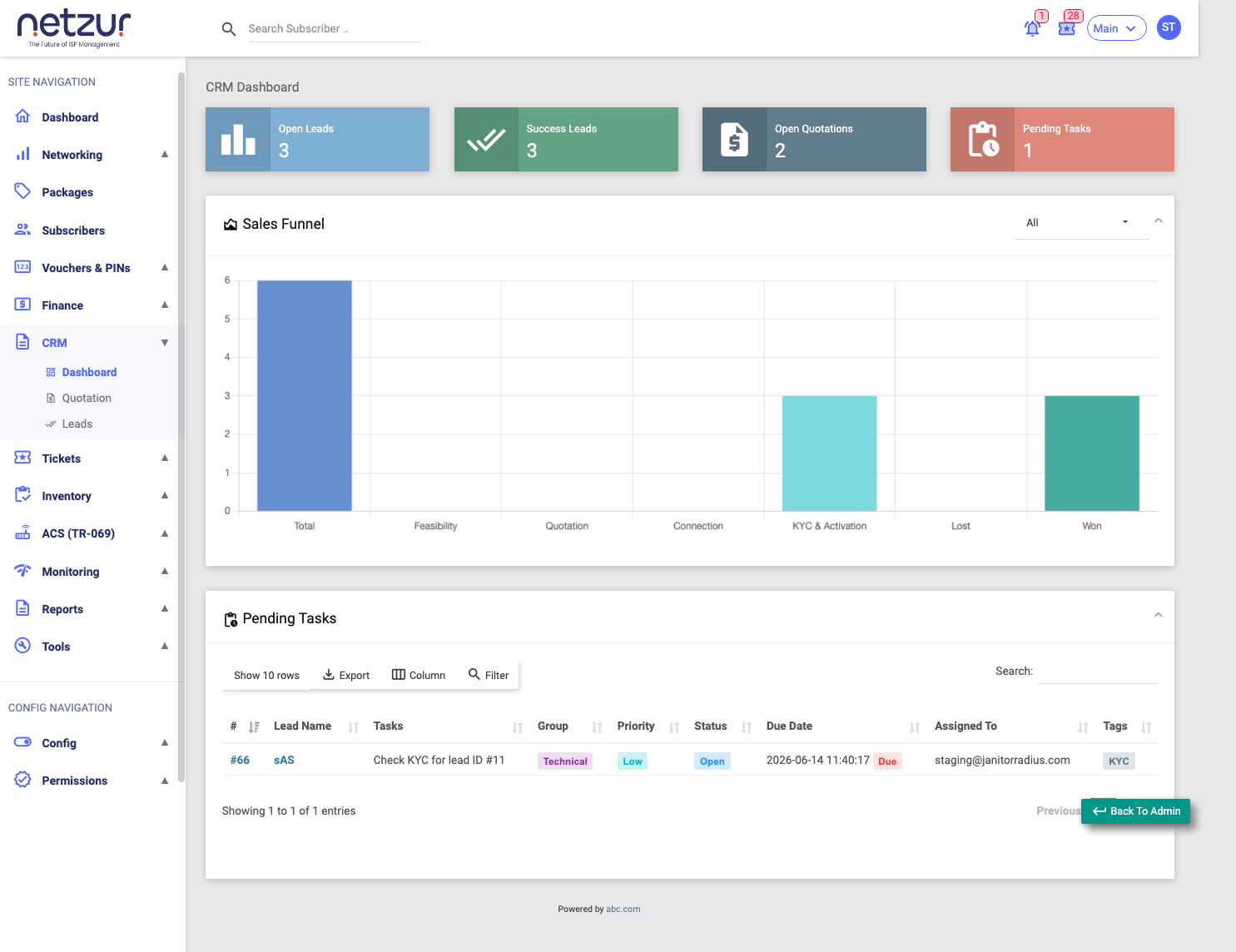
The four info boxes
Each box is a live count for your site, and clicking it opens the related page.
| Box | Shows | Opens |
|---|---|---|
| Open Leads | Leads still being worked on (not yet won or cancelled). | Leads list |
| Success Leads | Leads that were closed as won. | Leads list |
| Open Quotations | Quotations not yet converted to an invoice and not cancelled. | Quotations list |
| Pending Tasks | Lead-related tasks/tickets still Open or Re-opened. | Tickets list |
Sales Funnel chart
A bar chart showing how many leads sit at each stage of the pipeline:
- Total — all leads.
- Feasibility — at the feasibility-check stage.
- Quotation — passed feasibility, at the quotation stage.
- Connection — quotation accepted, at the connection stage.
- KYC & Activation — connection done, pending document verification / activation.
- Lost — leads that were cancelled.
- Won — leads closed successfully.
Use the month selector in the card header to restrict the funnel to a single month, or All for all-time. (The four info boxes above are always live/all-time and don't change with this selector.)
Pending Tasks table
A list of the onboarding tasks still needing action — the tickets raised from lead stages that are Open or Re-opened:
| Column | Meaning |
|---|---|
| # | Ticket number (opens the ticket). |
| Lead Name | The lead it belongs to (opens the lead). |
| Task | The task subject. |
| Group | Sales or Technical. |
| Priority | Low / Medium / High / Urgent. |
| Status | Open / Re-open / Resolve / Close. |
| Due Date | When it's due (a red Due badge marks overdue tasks). |
| Assigned To | Who it's assigned to. |
| Tags | Any tags. |
Use the Filter button to search by Group, Priority, Status or any column, and Export to copy/Excel/print the list.
Important Notes
- All figures are for your site only.
- The dashboard is a starting point — use the links to act on leads, quotations and tasks.