Adjust Stock
Overview
Adjust Stock lets you correct a product's in-stock quantity downward — for writing off units that were damaged, lost, or miscounted. It's a stock-reduction/correction tool, not a way to add stock.
Required Permissions
- Adjust Stock → Show to open it; Adjust Stock → Update to apply an adjustment.
Navigation
Inventory → Adjust Stock
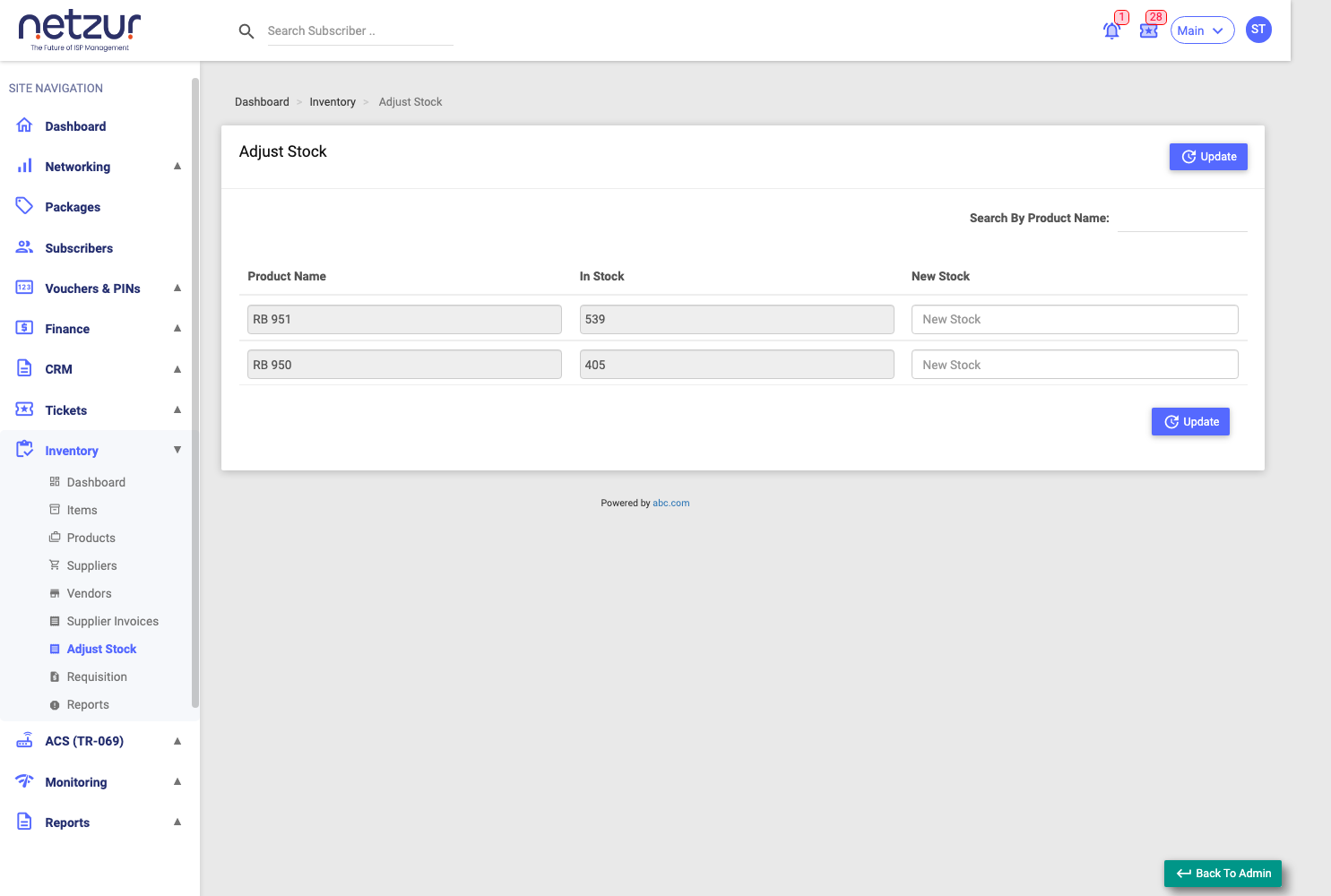
How it works
The screen lists every product that currently has in-stock items. For each row:
| Column | Meaning |
|---|---|
| Product Name | The product (read-only). |
| In Stock | Its current in-stock count (read-only). |
| New Stock | Type the new in-stock number you want. |
Enter a New Stock value for the rows you want to correct, then select Update.
- The new number must be lower than or equal to the current In Stock. Entering a higher number is rejected ("you cannot delete stock product").
- For each reduced row, the system removes the difference (old count − new count) worth of in-stock items and logs a "Stock reset" entry.
- Rows you leave blank are skipped.
Important Notes
- This screen only reduces stock. To add stock, add items or record a supplier invoice.
- There's no reason/remark field here — the change is recorded automatically in the audit log. Only in-stock items are removed; sold, rented, or assigned units are never affected.