IPv4 Pool Overview
Overview
An IPv4 pool is a range of internet (IPv4) addresses that Netzur IMBS hands out to subscribers who need a static IP — a fixed address that stays the same each time they connect. On the IPv4 Pool page you create these ranges and track which addresses are used, free, or historically assigned.
Who Can Use This Feature
Network administrators and engineers.
Required Permissions
- IPv4 Pool → List to view.
- IPv4 Pool → Add / Update / Delete to manage pools.
Prerequisites
- You know which IPv4 address range(s) your ISP owns and can assign to customers.
Navigation
Networking → IPv4 Pool
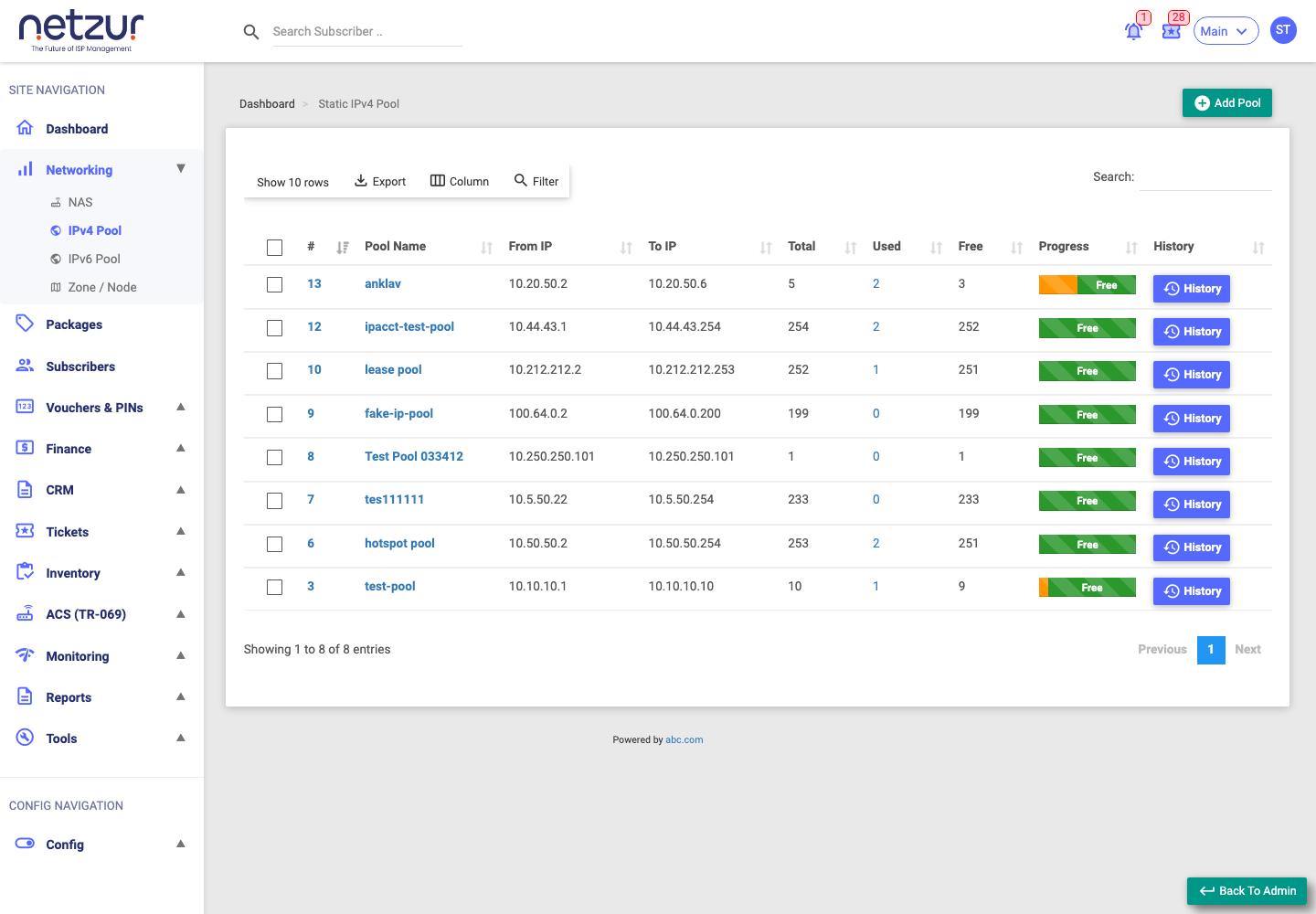
The IPv4 Pool list
| Column | Meaning |
|---|---|
| # | Internal reference number of the pool. |
| Pool Name | The name you gave the pool (a link — opens Edit). |
| From IP | First address in the range. |
| To IP | Last address in the range. |
| Total | Total addresses in the range. |
| Used | How many are currently assigned (a link — opens Used addresses). |
| Free | How many are still available. |
| Progress | A bar showing how full the pool is. |
| History | Opens the pool's allocation history. |
Above the list you can Add Pool, Export, choose Columns, Filter and Search.
What you can do
- Add Pool — create a new range (see Add an IPv4 Pool).
- Edit / Delete — open a pool by its name to change it or delete it (see Edit and Delete a Pool).
- Used addresses — click the Used count to see which addresses are assigned and to whom.
- History — use the History button to see the pool's allocation history (see Track Usage and History).
Important Notes
- Pools provide static IPs. Subscribers on dynamic IPs don't consume pool addresses.
- Deleting or shrinking a pool that has assigned addresses can affect those subscribers — check the Used list first.
Common Mistakes
- Overlapping ranges between pools.
- Deleting a pool that still has addresses assigned to live subscribers.
Troubleshooting
| Problem | Likely cause | What to do |
|---|---|---|
| No free addresses when adding a subscriber | The pool is fully used (Free is 0) | Check Used addresses; add a new pool or free some up. |
| A subscriber's static IP looks wrong | Assigned from the wrong pool | Review the subscriber's technical settings and the pool's Used list. |