NAS Overview
Overview
A NAS (Network Access Server) is the router or gateway that your subscribers connect through — for example a MikroTik router. When a subscriber tries to get online, the NAS asks Netzur IMBS "is this customer allowed, and what speed and limits do they get?" using a protocol called RADIUS. Netzur answers, and the NAS lets the customer online with the right plan.
The NAS page is where you register each of these devices so Netzur can authenticate and manage the subscribers on them.
Every NAS you add needs a Shared Secret — a password that the router and Netzur use to trust each other — and a CoA-Port, which lets Netzur send live instructions (like disconnecting a session) to the router.
Who Can Use This Feature
Network administrators and engineers who set up and maintain the ISP's routers.
Required Permissions
- NAS → List to view the NAS page.
- NAS → Add / Update / Delete to create, edit or remove a NAS.
- NAS → Mikrotik / Hotspot for the MikroTik-specific and hotspot options.
Prerequisites
- The router is installed and reachable on the network.
- You know the router's IP address, the NAS type (brand/model family), and can set a shared secret on it.
Navigation
Networking → NAS
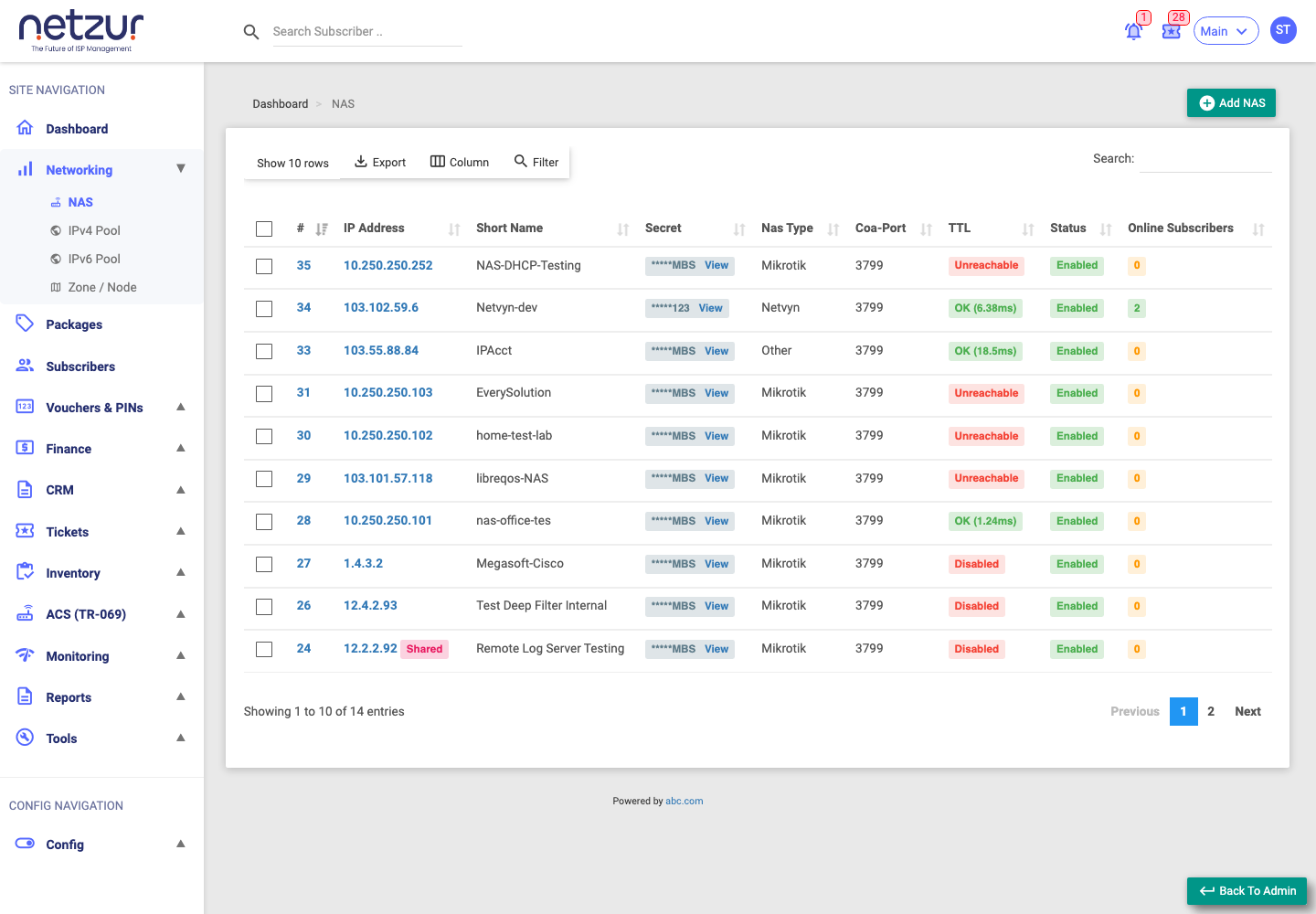
The NAS list
The NAS page lists every registered device with these columns:
| Column | Meaning |
|---|---|
| # | The internal reference number of the NAS. |
| IP Address | The management IP address of the router. |
| Short Name | A friendly name you give the NAS. |
| Secret | The shared secret, hidden by default. Select View to reveal it. |
| Nas Type | The device family (Mikrotik, Cisco, Netvyn, Other, etc.). |
| Coa-Port | The port used to send live "change/disconnect" instructions. |
| TTL | Ping time-to-live used for the reachability check. |
| Status | Live reachability: OK (…ms), Unreachable, or Disabled. |
| Online Subscribers | How many subscribers are currently online through this NAS. |
Above the list you can Add NAS, Export the list, choose Columns, Filter, Search, and change how many rows show per page.
Actions available on each NAS
- Add NAS — register a new device (see Add a NAS).
- Edit — change a NAS's settings.
- View (Secret) — reveal the shared secret for that NAS.
- Statistics — live device stats (uptime, CPU, memory, interface traffic) for supported devices.
- Audit — the history of changes to that NAS.
- Hotspot — for hotspot devices, configure captive-portal self-registration (see Hotspot Configuration).
- Delete — remove the NAS.
Important Notes
- The shared secret must match exactly on both the router and in Netzur, or subscribers on that NAS cannot authenticate.
- Status is a live check — Unreachable means Netzur cannot reach the router right now (network/firewall/credentials), not necessarily that customers are offline.
- ⚠ Saving a NAS restarts the RADIUS service so the change takes effect. Plan changes for quiet periods where possible.
Common Mistakes
- Typing the shared secret differently on the router and in Netzur.
- Using the wrong NAS type, which can change how sessions are handled.
- Blocking the CoA-Port on a firewall, which stops live disconnect/suspend from working.
Troubleshooting
| Problem | Likely cause | What to do |
|---|---|---|
| Status shows Unreachable | Router offline, firewall, or wrong IP | Confirm the router is up and reachable; check the IP and any firewall rules. |
| Subscribers on a NAS can't authenticate | Shared secret mismatch | Re-enter the same secret on the router and in Netzur. |
| Disconnect/suspend doesn't take effect | CoA-Port blocked or wrong | Confirm the CoA-Port is open and matches the router. |
Related Guides
- Add a NAS
- IPv4 Pool (coming soon)
- Dashboard Overview