Add an Internet Package
Overview
This page explains how to create a regular internet plan — its name, group, price, speeds and limits — which subscribers can then be assigned to.
Who Can Use This Feature
Managers and administrators.
Required Permissions
- Package → Add.
Prerequisites
- At least one Package Group exists to place the package in.
- You know the plan's price, speeds, data/time allowance and validity.
Navigation
Packages → Add Package
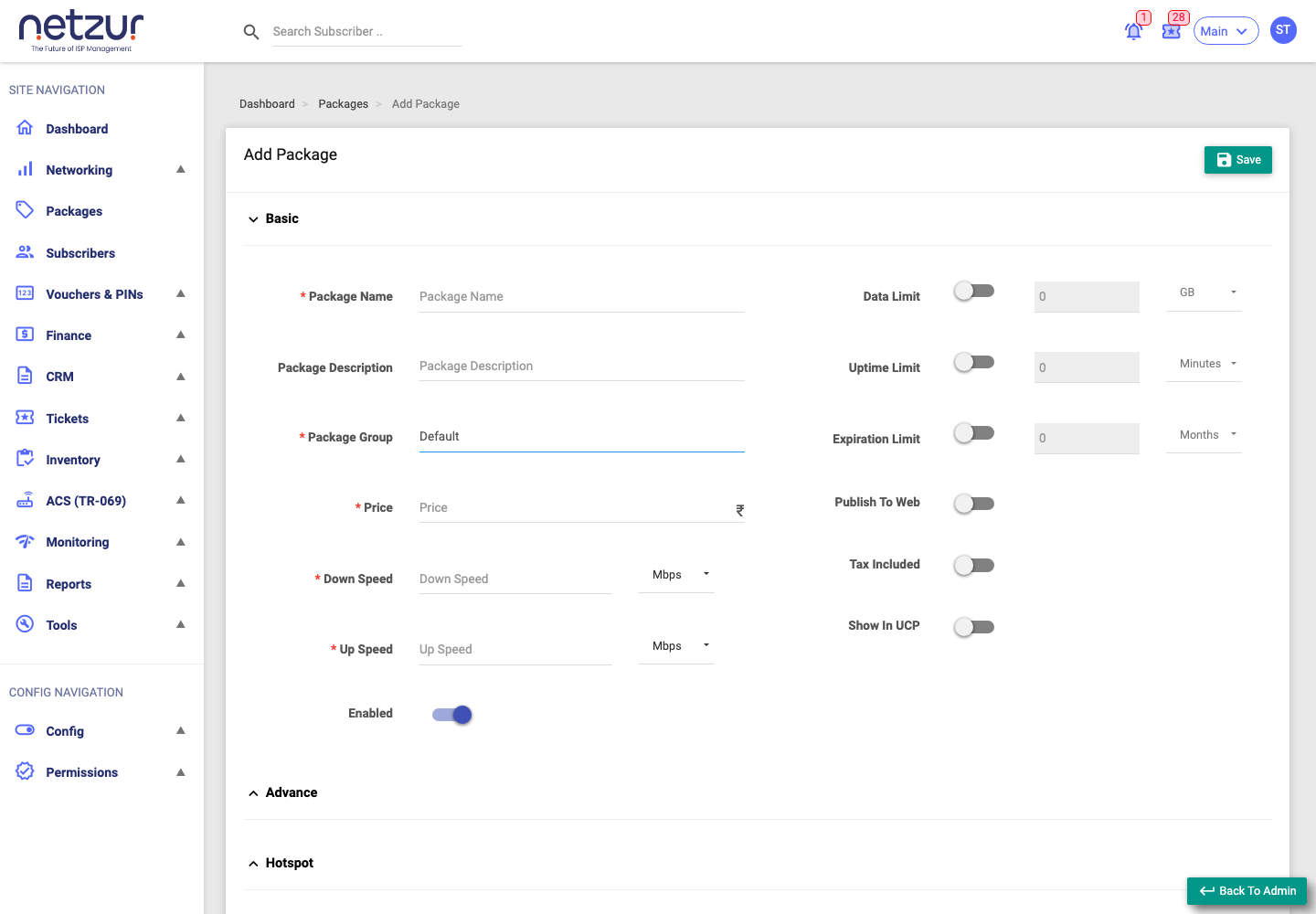
Step-by-Step Instructions
- Go to Packages and select Add Package.
- In the Basic section, complete the required fields (marked *):
- Package Name, Package Group, Price.
- Down Speed and Up Speed — enter a number and choose the unit (Kbps/Mbps/Gbps).
- Set the allowances as needed:
- Data Limit (with unit) — leave blank/appropriate value for unlimited data.
- Uptime Limit — a time allowance, if the plan is time-based.
- Expiration Limit — how long the plan lasts (e.g.
1 Months,30 Days,24 Hours).
- Set the toggles: Enabled, Publish To Web, Tax Included, Show In UCP (show in the subscriber portal).
- (Optional) Expand Advance for burst speed, minimum speeds and data/time carry-over (see the Advance section below).
- (Optional) Expand Hotspot for captive-portal redirect and advertisement options (see the Hotspot section below).
- Select Save.
Field Reference
| Field | Required | Description | Example |
|---|---|---|---|
| Package Name | Yes | The plan's name. | Fibre 100 Mbps |
| Package Description | No | A note about the plan. | Home unlimited |
| Package Group | Yes | The group/category the package belongs to. | Home Plans |
| Price (₹) | Yes | The plan's price. | 599 |
| Down Speed | Yes | Download speed + unit. | 100 Mbps |
| Up Speed | Yes | Upload speed + unit. | 100 Mbps |
| Enabled | No | Whether the plan is active. | On |
| Data Limit | No | Data allowance + unit (blank = as configured/unlimited). | 500 GB |
| Uptime Limit | No | Time allowance + unit. | 30 Days |
| Expiration Limit | No | Validity of the plan. | 1 Months |
| Publish To Web | No | Show the plan on the public website. | On/Off |
| Tax Included | No | Whether the price already includes tax. | On/Off |
| Show In UCP | No | Show the plan in the subscriber portal. | On/Off |
Advance section
The Advance section controls burst speed, guaranteed minimum speed, and whether unused data/time carries over to the next cycle. All of these are optional.
Turn on Enabled Burst Mode to reveal the burst fields. Burst lets a subscriber briefly go faster than the plan speed before settling to it.
| Field | Description | Example |
|---|---|---|
| Enabled Burst Mode | Turns burst on and reveals the burst fields. | On/Off |
| Burst Down Speed / Up Speed (+ unit) | The higher speed allowed during a burst. | 120 Mbps |
| Burst Time (Seconds) — Down / Up | How long a burst may last, in seconds. | 8 / 8 |
| Burst Down / Up Threshold (+ unit) | The average speed below which a burst is allowed to start. | 80 Mbps |
| Priority | Bandwidth priority for the plan (lower number = higher priority). | 8 |
| Minimum Down Speed / Up Speed (+ unit) | The lowest speed the subscriber is guaranteed. | 10 Mbps |
| Carry Data | Let unused data roll over to the next cycle. | On/Off |
| Carry With | What carries over — Same (only this package's data) or All. | Same / All |
| Carry Uptime | Let unused online time roll over to the next cycle. | On/Off |
| Carry Date | Let remaining validity/days roll over to the next cycle. | On/Off |
Usage-based throttling (drop speed after a data or time limit) is not set here — that is done with FUP rules after the package is saved. See Fair Usage Policy (FUP).
Hotspot section
The Hotspot section applies when subscribers on this plan connect through a captive-portal (hotspot). All fields are optional.
| Field | Description | Example |
|---|---|---|
| Redirect URL | The page a subscriber is sent to after they log in to the hotspot. | https://portal.example.com/welcome |
| Adv. URL | An advertisement page shown to subscribers on this plan. | https://ads.example.com |
| Adv. Interval | How often the advertisement is shown, in minutes. | 30 |
What Happens After Saving
The package is created and appears on the Internet tab. If Enabled, it can be assigned to subscribers and (if Publish To Web) shown on your website. Speed and limits are enforced through RADIUS when subscribers use the plan.
Important Notes
- Tax Included determines whether the price shown already contains tax — set it to match how you quote prices.
- Expiration Limit drives when subscribers on the plan are due to renew.
- Burst speed and FUP live under Advance — see Fair Usage Policy (FUP).
Common Mistakes
- Entering a speed number without checking the unit (e.g. Mbps vs Kbps).
- Forgetting to set an Expiration Limit, so the plan never expires as intended.
- Leaving Enabled off, so the plan can't be assigned.
Troubleshooting
| Problem | Likely cause | What to do |
|---|---|---|
| Can't select a Package Group | No groups exist | Create a package group first. |
| Subscribers get the wrong speed | Wrong unit or Advance/burst settings | Re-check Down/Up speed units and the Advance section. |
| Plan not on the website | Publish To Web off | Turn it on and save. |