Add-ons
Overview
An Add-on is an optional paid extra attached to a subscriber — such as an installation charge, a static IP, or a maintenance fee. Unlike top-ups and boosters, add-ons live on their own Addons tab in the Packages module and are grouped by Category rather than a package group.
Who Can Use This Feature
Managers and administrators who set pricing.
Required Permissions
- Addons → Add.
Prerequisites
- None beyond access — add-on categories are predefined (Installation Charges, Static IP, Maintenance).
Navigation
Packages → Addons tab → Add
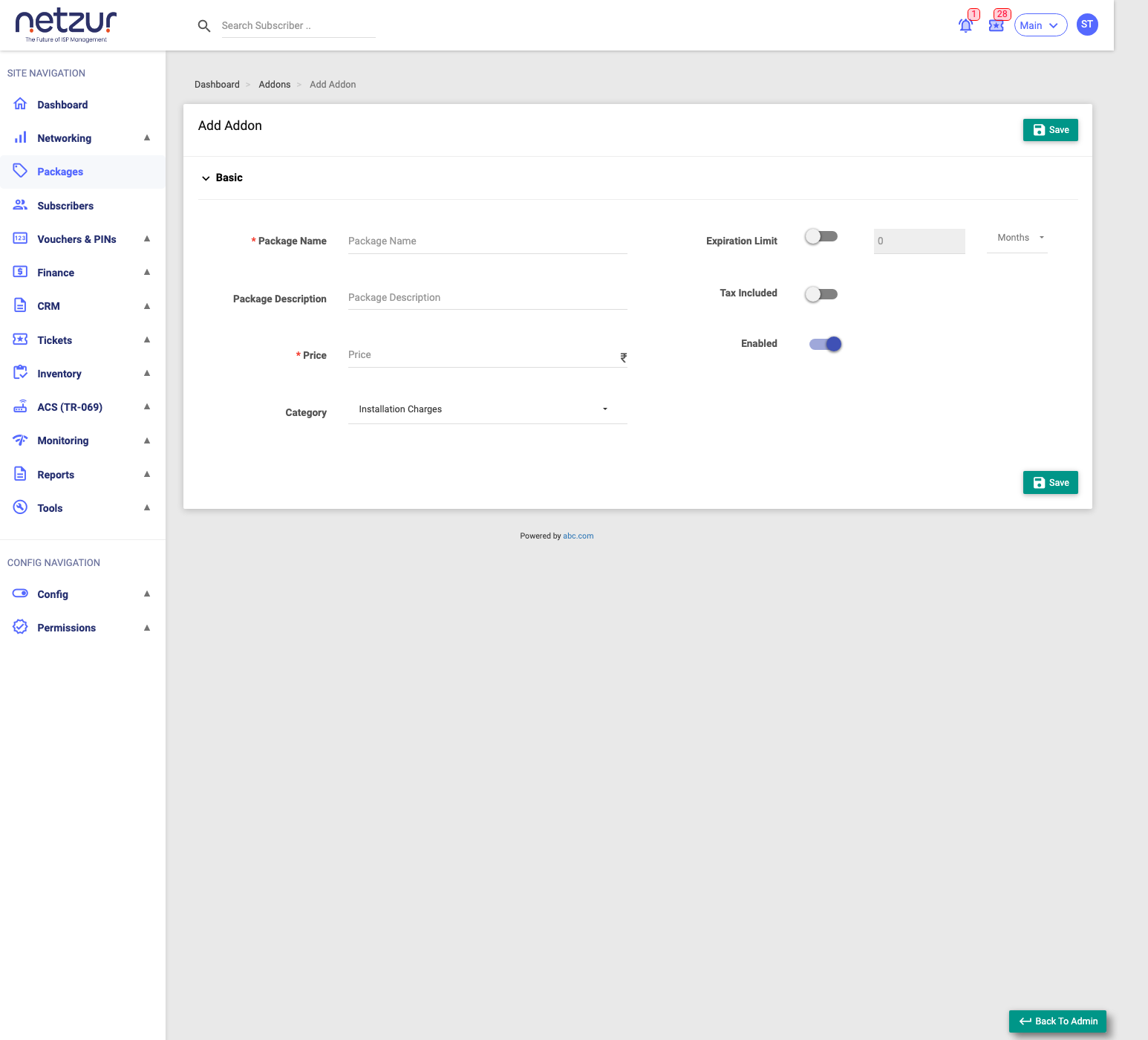
Step-by-Step Instructions
- Go to Packages and open the Addons tab.
- Select Add.
- Enter the Package Name and Price.
- Choose a Category — Installation Charges, Static IP, or Maintenance.
- (Optional) Turn on Expiration Limit and set a validity.
- Set Tax Included / Enabled and select Save.
Field Reference
| Field | Required | Description | Example |
|---|---|---|---|
| Package Name | Yes | The add-on's name. | Static IP |
| Package Description | No | A note about it. | — |
| Price (₹) | Yes | The price. | 100 |
| Category | Yes | The add-on category: Installation Charges, Static IP, or Maintenance. | Static IP |
| Expiration Limit | No | Toggle on, then set a validity + unit (Minutes/Hours/Days/Months). | 1 Months |
| Tax Included | No | Whether the price already includes tax. | On/Off |
| Enabled | No | Whether it can be sold. | On |
What Happens After Saving
The add-on appears on the Addons tab and becomes available to apply via Recharge ▾ → Add Addon on a subscriber's profile. A Static IP add-on can also carry IP-assignment settings when applied to the subscriber — see Subscriber: Top-ups, Boosters & Add-ons.
Important Notes
- Add-ons appear only on the Addons tab, not the Internet tab.
- The Category determines how the add-on is grouped and reported.
- An add-on has no speed or data of its own (it's a charge/feature) — for data use a Top-up, for speed a Speed Booster.
Common Mistakes
- Looking for add-ons on the Internet tab — they're on the Addons tab.
- Choosing the wrong Category, which affects reporting.