Custom RADIUS Attributes
Overview
A Custom Attribute is an extra RADIUS attribute that Netzur sends to your network equipment for every subscriber on a package. It is a low-level, vendor-specific setting — a Name, an Operator, and a Value — used to switch on behaviour that the standard package fields don't cover (for example a vendor's own rate-limit or a special session attribute).
This is a separate feature from Fair Usage Policy (FUP). They happen to sit in the same panel on the package Edit screen, but they do different jobs:
- FUP rules change a subscriber's speed after they use a set amount of data or time.
- Custom Attributes send fixed RADIUS values to the router for all subscribers on the plan, all the time.
Who Can Use This Feature
Network engineers who know the RADIUS attributes their equipment expects. This is an advanced feature — a wrong attribute can affect how subscribers connect.
Required Permissions
- Package → Update to add, edit or delete attributes.
- Package → Show to view them.
Prerequisites
- The package already exists (see Add an Internet Package).
- You know the exact attribute name, operator and value your network vendor requires. These come from your equipment's RADIUS dictionary, not from Netzur.
How to Access Custom Attributes
- Go to Packages and open the Internet tab.
- Find the package and select Edit (the pencil).
- Scroll to the Rule / Custom Attribute panel and expand it.
- Below the FUP Rules table, use the Custom Attribute table's Add button (or the pencil/bin on a row to edit or delete).
Packages → (open a package) → Edit → Rule / Custom Attribute → Custom Attribute
The Custom Attribute table lists what's already attached. For example, the 20Mbps_Unlimited package carries a single attribute that puts its subscribers on a MikroTik address list:
| Action | Name | Operator | Value |
|---|---|---|---|
| Edit / Delete | Mikrotik-Address-List | = | Peering |
Each column means:
| Column | Meaning |
|---|---|
| Action | Edit or delete the attribute. |
| Name | The RADIUS attribute name. |
| Operator | How the value is applied (e.g. =). |
| Value | The value sent for this attribute. |
Adding a Custom Attribute
Select Add to open the Add Package Attribute dialog.
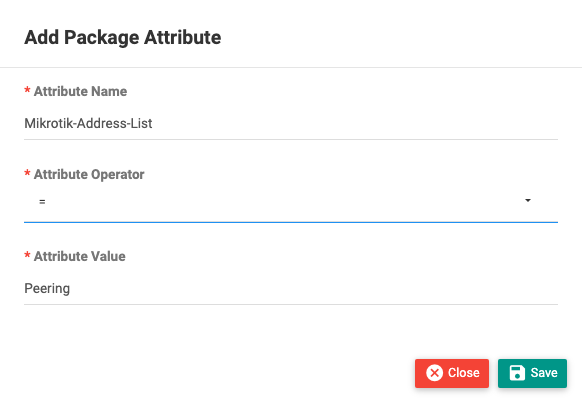
| Field | Required | Description |
|---|---|---|
| Attribute Name | Yes | The RADIUS attribute. Start typing and Netzur suggests known attribute names from its dictionary — pick the exact one your equipment expects. |
| Attribute Operator | Yes | How the value is set. = and := are the common choices; others (+=, ==, !=, >, <, =~, and so on) are available for advanced RADIUS rules. |
| Attribute Value | Yes | The value to send (for example Peering for an address-list, or a bit-rate in bits per second for a rate-limit attribute). |
The screenshot above shows this filled in for the 20Mbps_Unlimited package: Mikrotik-Address-List = Peering.
Select Save. The attribute appears in the Custom Attribute table and is applied to subscribers on this package through RADIUS.
What Happens After Saving
The attribute is stored with the package and sent to the network for every subscriber on that plan at their next session/authentication. Because it applies to everyone on the package immediately, add attributes carefully.
Important Notes
- Attributes are vendor-specific — the correct name, operator and value come from your equipment's documentation, not from Netzur.
- An incorrect attribute can change or break how subscribers connect. Test on one plan before rolling it out widely.
- Use the operator your vendor specifies.
=sets a default;:=forces/overrides. If unsure, use=.
Common Mistakes
- Typing an attribute name that your equipment doesn't recognise (it will be ignored, or cause errors).
- Using the wrong operator, so the value isn't applied as intended.
- Confusing Custom Attributes with FUP — throttling by usage is done with FUP rules, not attributes.
Troubleshooting
| Problem | Likely cause | What to do |
|---|---|---|
| Attribute seems to have no effect | Wrong name, operator, or the device ignores it | Confirm the exact attribute name and operator from your vendor's RADIUS dictionary. |
| Subscribers on a plan behave unexpectedly | An attribute is overriding a setting | Review the package's Custom Attributes and remove or correct the offending one. |
The exact attribute names available depend on your network equipment's RADIUS dictionary (for MikroTik networks, names such as Mikrotik-Address-List, Mikrotik-Rate-Limit and similar). Use the name-search field to see which ones your deployment recognises.