Speed Boosters
Overview
A Speed Booster gives a subscriber a temporary increase in speed for a set period — for example a "1-Day Turbo" that raises them to 100 Mbps for 24 hours. When the booster expires, the subscriber returns to their plan speed.
Speed Boosters are created in the Packages module and later applied to a subscriber from their profile.
Who Can Use This Feature
Managers and administrators who set pricing.
Required Permissions
- Package → Add (speed booster).
Prerequisites
- At least one Package Group exists to place the booster in.
Navigation
Packages → Internet tab → Add Package ▾ → Booster
Step-by-Step Instructions
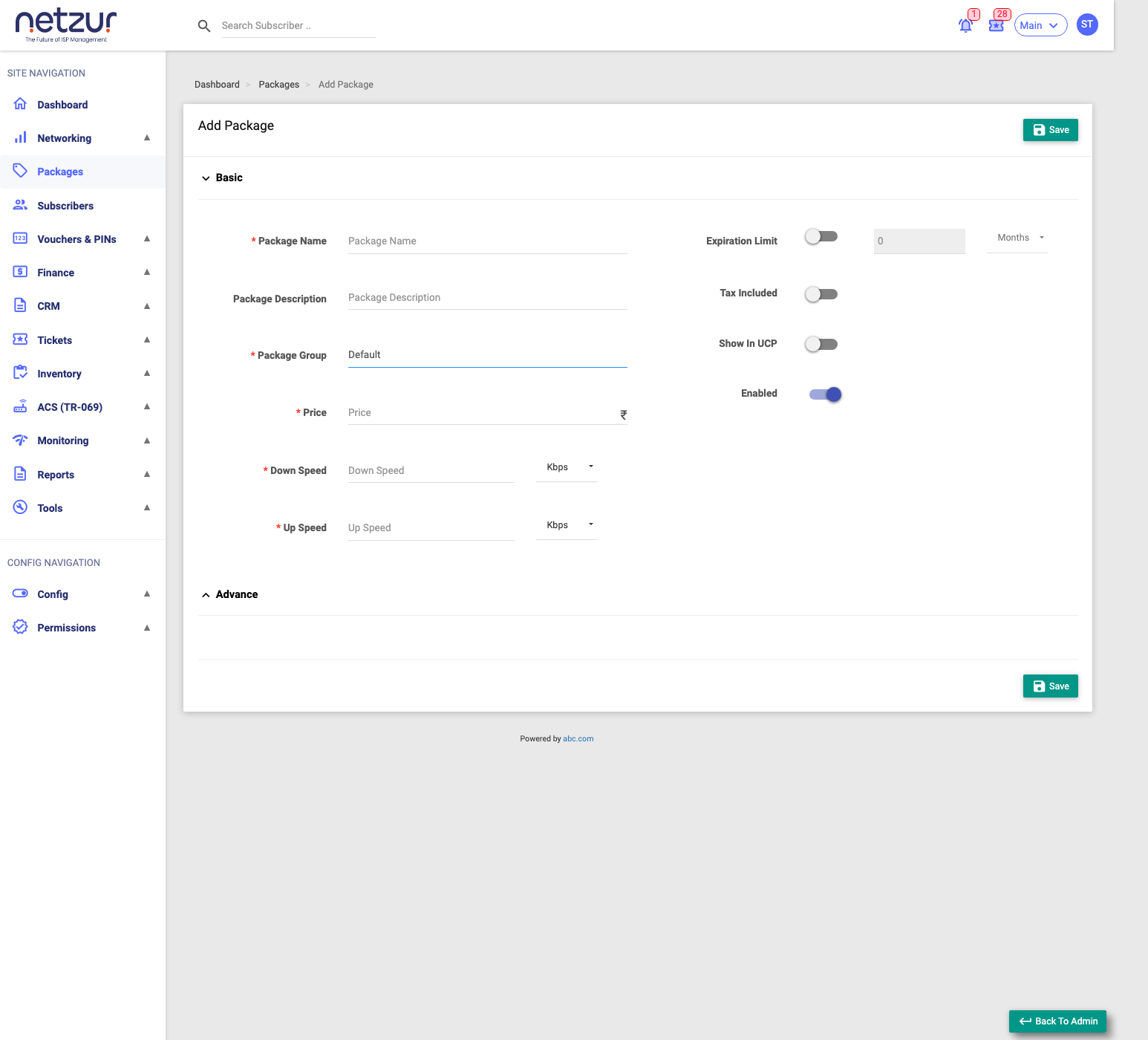
- Go to Packages, and on the Internet tab open the Add Package ▾ menu.
- Choose Booster.
- Enter the Package Name, Package Group and Price.
- Set the boosted Down Speed and Up Speed (with units).
- Turn on Expiration Limit and set how long the boost lasts (e.g.
1 Days). - (Optional) Expand Advance for burst and minimum-speed settings.
- Set the toggles (Tax Included, Show In UCP, Enabled) and select Save.
Field Reference
Basic
| Field | Required | Description | Example |
|---|---|---|---|
| Package Name | Yes | The booster's name. | 1-Day Turbo |
| Package Description | No | A note about it. | — |
| Package Group | Yes | The group it belongs to. | Boosters |
| Price (₹) | Yes | The price. | 30 |
| Down Speed / Up Speed (+ unit) | Yes | The boosted speeds while active. | 100 Mbps |
| Expiration Limit | Yes | Toggle on, then set the duration + unit (Minutes/Hours/Days/Months). | 1 Days |
| Tax Included / Show In UCP / Enabled | No | Pricing and visibility options. | On/Off |
Advance
| Field | Description |
|---|---|
| Burst Down/Up Speed, Threshold, Time, Priority | Optional burst on top of the boost — same as a package's Advance burst. |
| Minimum Down / Up Speed | The lowest guaranteed speed during the boost. |
What Happens After Saving
The booster becomes available to apply via Recharge ▾ → Add Speed Booster on a subscriber's profile. While active, the subscriber's speed rises; the active booster shows against the package in the profile's Quick Information, and it automatically ends at expiry.
Important Notes
- A booster is temporary and time-limited — it changes speed, not the plan or its data allowance.
- Set the Expiration Limit carefully; it defines how long the higher speed lasts.
Common Mistakes
- Confusing a booster with a Top-up (which adds data/time, not speed).
- Leaving Expiration Limit off, so the boost has no defined duration.