Top-ups
Overview
A Top-up adds extra data or time on top of a subscriber's existing plan — for example a "10 GB add-on" a customer buys mid-month when they run low. It does not change their plan; it just tops up the allowance.
Top-ups are created in the Packages module and later applied to a subscriber from their profile.
Who Can Use This Feature
Managers and administrators who set pricing.
Required Permissions
- Package → Add (top-up).
Prerequisites
- At least one Package Group exists to place the top-up in.
Navigation
Packages → Internet tab → Add Package ▾ → Top-up
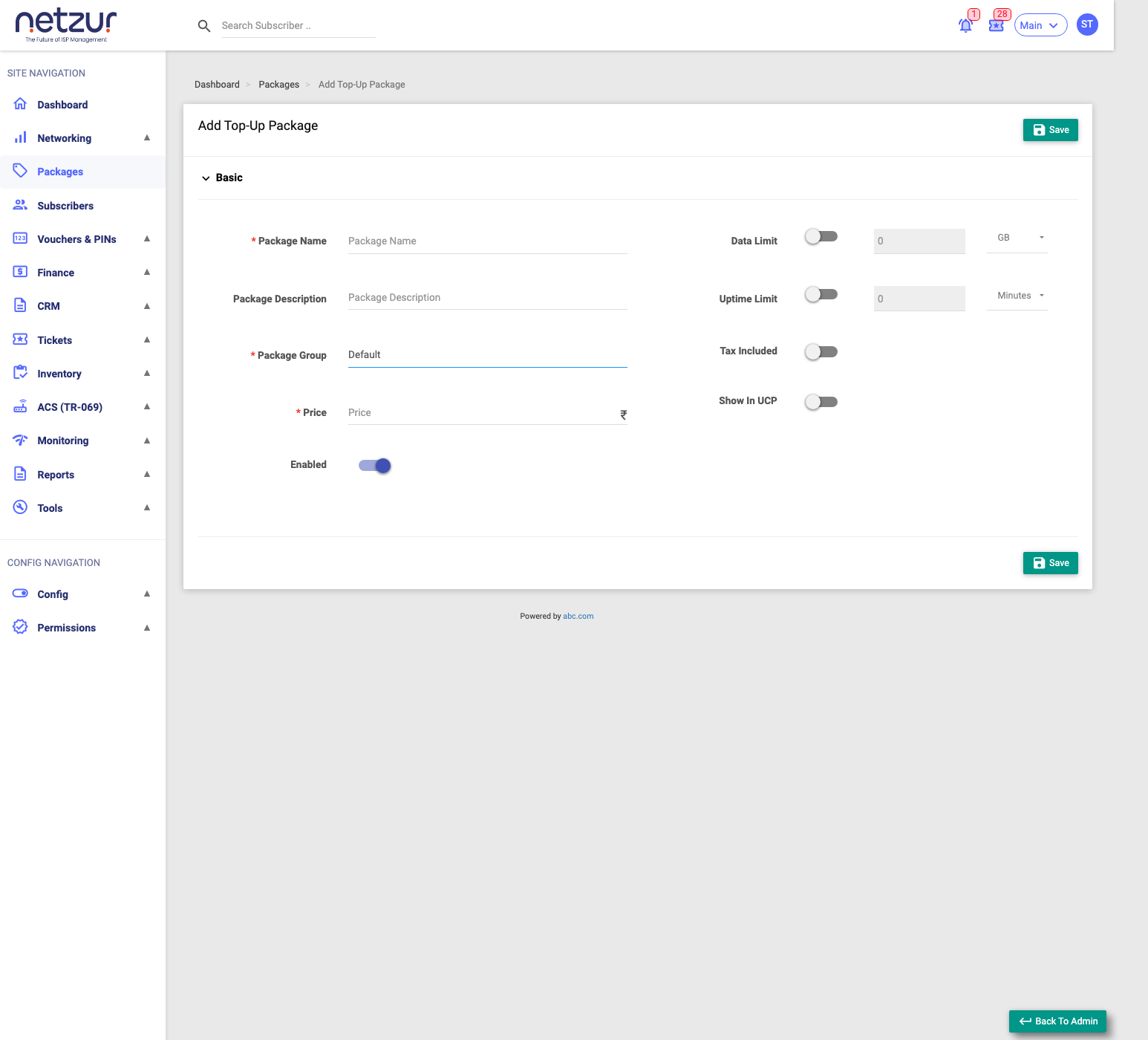
Step-by-Step Instructions
- Go to Packages, and on the Internet tab open the Add Package ▾ menu.
- Choose Top-up.
- Enter the Package Name, Package Group and Price.
- Turn on Data Limit and/or Uptime Limit and enter the amount + unit the top-up grants.
- Set the toggles (Tax Included, Show In UCP, Enabled) as needed.
- Select Save.
Field Reference
| Field | Required | Description | Example |
|---|---|---|---|
| Package Name | Yes | The top-up's name. | 10 GB Top-up |
| Package Description | No | A note about it. | One-time data |
| Package Group | Yes | The group it belongs to. | Top-ups |
| Price (₹) | Yes | The price. | 50 |
| Data Limit | No | Toggle on, then enter the extra data + unit (KB/MB/GB/TB). | 10 GB |
| Uptime Limit | No | Toggle on, then enter the extra time + unit (Minutes/Hours/Days). | 2 Days |
| Tax Included | No | Whether the price already includes tax. | On/Off |
| Show In UCP | No | Offer the top-up in the customer self-care portal. | On/Off |
| Enabled | No | Whether it can be sold. | On |
What Happens After Saving
The top-up becomes available to apply to subscribers via Recharge ▾ → Add Top-up on a subscriber's profile, which takes payment and adds the data/time to their current allowance.
Important Notes
- A top-up adds allowance to the current plan — it does not extend the plan's expiry (use a recharge for that).
- Turn on Show In UCP only if you want customers to buy it themselves in the portal.
Common Mistakes
- Forgetting to toggle on Data Limit/Uptime Limit, so the top-up grants nothing.
- Building a "faster plan" as a top-up — that's a Speed Booster.