Change Package & Price
Overview
These two actions change which plan a subscriber is on and what they pay for it:
- Change/Add Package — move the subscriber to a different plan.
- Overwrite Package Price — give this subscriber a custom price for their plan, different from the list price.
Required Permissions
- Subscriber → Change Package and the price-overwrite permission.
Navigation
Subscribers → (open a subscriber) → Change/Add Package (header) and Other Actions ▾ → Overwrite Package Price
Change/Add Package
The Change/Add Package button opens the change-package dialog:
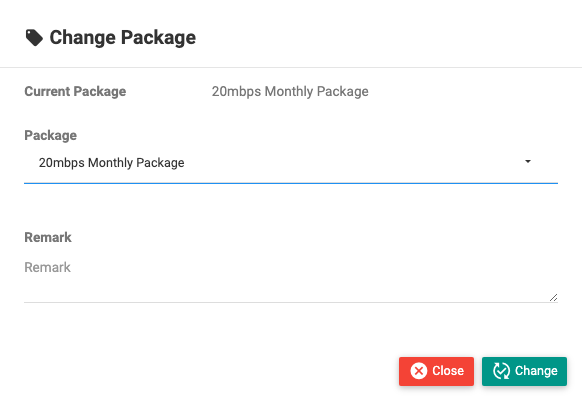
| Field | Description |
|---|---|
| Current Package | Shown for reference. |
| Package | The new plan (searchable list). |
| Upgrade package amount | The pro-rated cost to switch, calculated for you. |
| Remark | Audit note. |
Confirm to move the subscriber to the new plan; the new speed and limits take effect. Whether an invoice is adjusted depends on the site-wide Change Package With Settlement setting, and a package change never changes the expiry/due date — see Changing a Package. (For postpaid, a package change isn't done here — you deactivate and re-activate with the new plan.)
Change/Add Package may require the subscriber to be KYC / OTP / account verified first — see Notes, Messaging & Verification.
Overwrite Package Price
Other Actions ▾ → Overwrite Package Price sets a subscriber-specific price for the current plan:
| Field | Description |
|---|---|
| Current Package / Package Price | Shown for reference. |
| Overwrite (toggle) | Turn the custom price on. |
| Overwrite Price | The price this subscriber pays. |
| Remark | Audit note. |
From then on, this subscriber's renewals use the overwritten price until you change it back. (In the Recharge dialog you can also choose "Use your last price" to bill the previously-used amount for a single recharge.)
Important Notes
- Changing the package can change speed, data and price, and may take a pro-rated payment.
- Overwrite Package Price persists across renewals — remember it when a subscriber's renewal amount differs from the plan's list price.
Common Mistakes
- Overwriting a price and later forgetting why the subscriber's renewals differ from everyone else's.
- Changing package while the subscriber is unverified, when verification is required.
Related Guides
- Recharge and Renew
- Change Group & Zone
- Settings tab (native vs overridden price in the portal)