Recharge and Renew
Overview
Recharging is how you give a subscriber a plan and extend their service — the single most common action in the module. This page covers the four related actions on the Recharge menu in the profile header:
- Recharge — renew/extend the current (or a chosen) plan now.
- Advance Recharge — queue a recharge to apply later (or when the plan next expires).
- Activate — the postpaid equivalent that starts service.
- Upcoming Recharge — view and manage recharges you've queued.
Who Can Use This Feature
Front-desk and billing staff.
Required Permissions
- Subscriber → Recharge (and Advance Recharge / Activate for those).
Navigation
Subscribers → (open a subscriber) → Recharge ▾
Recharge
Select Recharge ▾ → Recharge to open the recharge dialog.
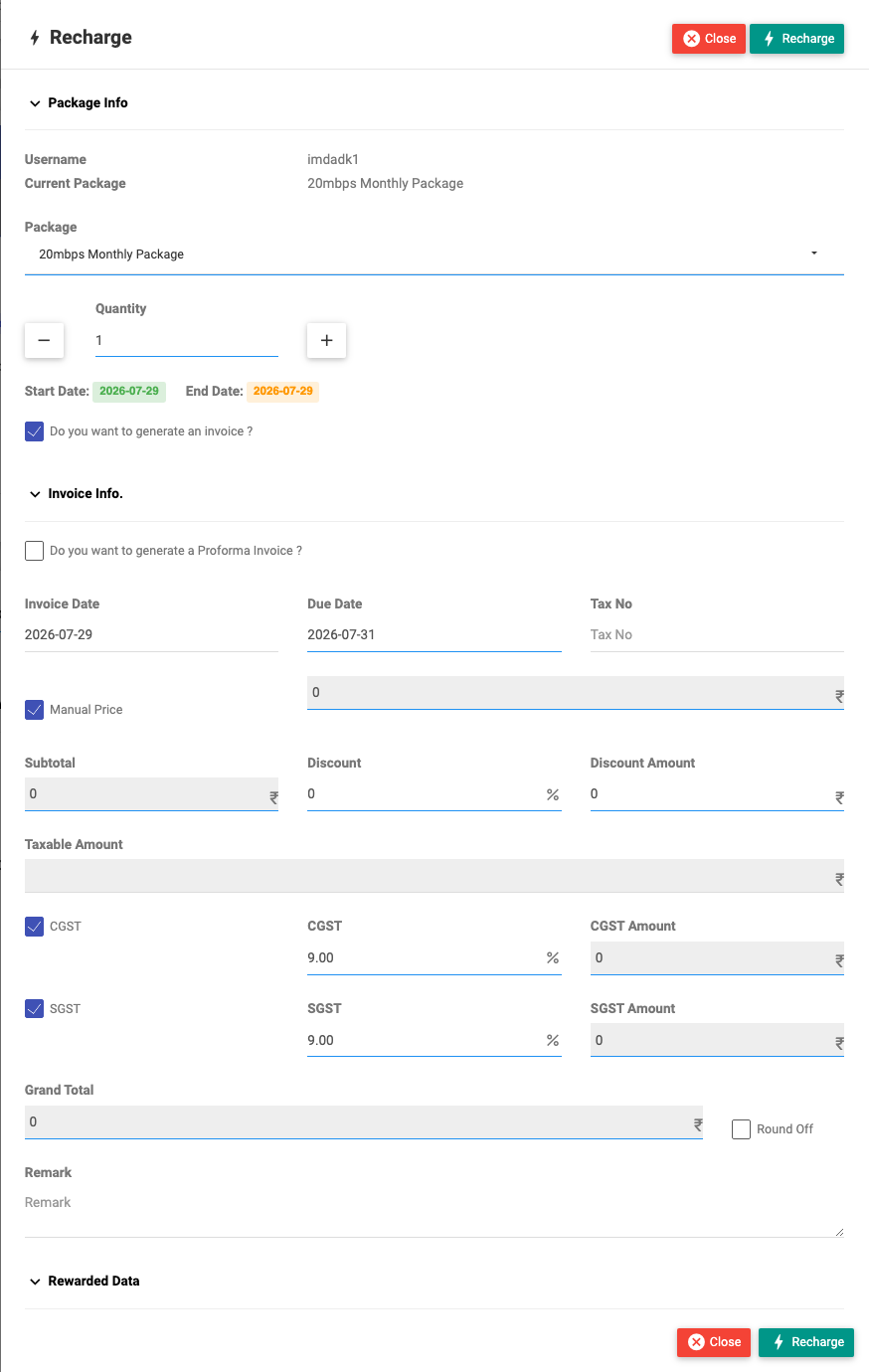
Package Info
| Field | Description |
|---|---|
| Package | The plan to recharge (defaults to the current one; you can pick another). |
| Quantity | How many periods to recharge at once (use the −/+ buttons). |
| STB | Set-top box, for TV plans. |
| Do you want to generate an invoice? | Whether this recharge raises an invoice. |
The Start Date and End Date the recharge will cover are shown as badges.
Invoice Info
| Field | Description |
|---|---|
| Generate as Proforma Invoice? | Raise a proforma (quote) instead of a tax invoice. |
| Invoice Date / Due Date | Invoice dates. |
| Tax No | The customer's tax number on the invoice. |
| Use your last price for this package? | Bill this subscriber's previously-used price. |
| Manual Price | Type a custom price for this recharge. |
| Subtotal | The base amount (from the plan or manual price). |
| Discount (%) / Discount Amount | Apply a discount either way. |
| Taxable Amount | Amount tax is calculated on. |
| Taxes (e.g. CGST / SGST) | Tick the taxes to apply; percent and amount show per tax. |
| Grand Total | The final payable amount. |
| Round Off | Round the total. |
| Use wallet balance? | Pay from the subscriber's wallet (shows the balance). |
| Remark | A note recorded in the audit history. |
Rewarded Data
Optionally grant bonus Expiration, Uptime or Data on top of the plan (for example, a goodwill top-up).
Select Recharge to apply. The plan is extended, any invoice/payment is recorded, and the change shows on the Finance tab.
If the subscriber still has active service, recharging the main plan asks whether to add it in advance (take effect at the next expiry) or overwrite now (apply immediately). See Extras & Overrides.
Advance Recharge
Recharge ▾ → Advance Recharge queues a recharge for the future. It's the recharge dialog plus:
| Field | Description |
|---|---|
| Quantity | Number of periods. |
| Recharge next to expire? | Apply automatically when the current plan next expires. |
| Schedule Date | The date the queued recharge should run. |
Use it to pre-collect payment and have the plan extend itself later without manual work.
Activate (postpaid)
For postpaid subscribers, Recharge ▾ → Activate starts service using the same invoicing dialog as Recharge, with the pro-rated price for the partial first period calculated for you.
Upcoming Recharge
Recharge ▾ → Upcoming Recharge lists the advance recharges queued for the subscriber, where you can review or delete a scheduled recharge (with a remark).
What Happens After Recharging
The subscriber's Expiry, Data and Uptime update in the header, an invoice/payment lands in Finance, and — if they were expired/blocked — they can get back online.
Important Notes
- ⚠ Recharge can take real payment (wallet or a recorded invoice) — confirm the amount and package first.
- Use last price and Manual Price override the plan's list price — use deliberately.
- Advance Recharge will act on its own later; make sure the schedule and "next to expire" setting are right.
Common Mistakes
- Recharging the wrong package (the dialog defaults to the current plan — change it if needed).
- Forgetting to tick the correct taxes, so the invoice total is wrong.
- Queuing an advance recharge without payment when wallet is empty.