Status Changes (Disable, Suspend, Terminate…)
Overview
These actions change whether — and how — a subscriber can use the service. They range from a quick reversible block to permanently ending service:
- Disable / Enable — block or unblock access.
- Suspend — temporarily suspend the subscriber.
- Closed Connection — mark the connection open/closed.
- Terminate — end the subscriber's service (with invoice rollback options).
- Deactivate — postpaid deactivation.
- Disconnect — drop the current live session.
- Delete — remove the subscriber.
Nearly all of them ask for a Remark so the reason is recorded in the Audit Timeline.
Required Permissions
- The matching permission for each action (Disable, Terminate, Delete, etc.).
Navigation
Subscribers → (open a subscriber) → top-right buttons and Other Actions ▾
Disable / Enable
The Disable button blocks the subscriber's access immediately (they go Blocked); Enable restores it. Each asks only for a Remark. Use Disable for a quick, fully reversible stop (e.g. non-payment) without ending the plan.
Suspend
Other Actions ▾ → Suspend Subscriber temporarily suspends the subscriber:
| Field | Description |
|---|---|
| Temporary Suspended | Turn suspension on/off. |
| Remark | Reason. |
Temporary suspension is the basis of the prepaid pay-by-commitment hybrid (pause until the due is cleared, without touching expiry). It needs the site-wide Allow Temporary Subscriber Suspended switch — see Prepaid (On-Demand).
Closed Connection
Other Actions ▾ → Closed Connection marks the physical connection as open or closed (e.g. line disconnected at the premises):
| Field | Description |
|---|---|
| Closed Connection | Open / Closed. |
| Remark | Reason. |
Terminate
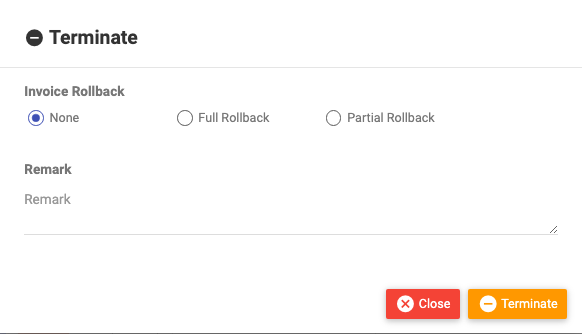
The Terminate button ends the subscriber's service. Because termination can affect billing, you choose how to handle any open invoice:
| Field | Description |
|---|---|
| Invoice Rollback | None (no refund), Partial Rollback (refund unused days), or Full Rollback (full refund). |
| Remark | Reason. |
For exactly what each rollback does (and the reseller wallet effect), see Terminating & Refunds.
Deactivate (postpaid)
For postpaid subscribers, Deactivate stops service at the end of the cycle:
| Field | Description |
|---|---|
| Generate recurring invoice | Whether to raise the final recurring invoice. |
| Remark | Reason. |
Disconnect (drop the live session)
Dropping just the current session (without disabling the account) is done from the Statistics tab online-session row, or via the disconnect action — the subscriber can reconnect immediately unless also disabled.
Delete
The top-right Delete removes the subscriber. Deleted subscribers can be recovered from the list's disabled/deleted view where available, but treat Delete as a last resort.
Choosing the right one
| You want to… | Use |
|---|---|
| Briefly stop a non-payer, reversible | Disable |
| Pause temporarily | Suspend |
| Record the line is physically cut | Closed Connection |
| Kick the current session only | Disconnect |
| End service for good | Terminate |
| Remove the record entirely | Delete |
Important Notes
- ⚠ Terminate and Delete are heavy actions affecting real customers — prefer Disable/Suspend when the stop might be temporary.
- Terminate with Full Rollback reverses invoices — make sure that's intended for your books.
- Always leave a Remark; it's the record of why in the audit history.
Related Guides
- Statistics tab (disconnect a live session)
- Bulk Actions (disable/terminate many at once)