Postpaid (Recurring)
Overview
Postpaid (Recurring) runs a repeating billing cycle. On a set Billing Day each period the system raises the invoice, and it manages the whole month — grace, disconnection and deactivation — automatically. The customer is billed for service and pays against invoices, rather than pre-paying.
Set it on the subscriber's Settings tab: Billing Type → Postpaid (Recurring).
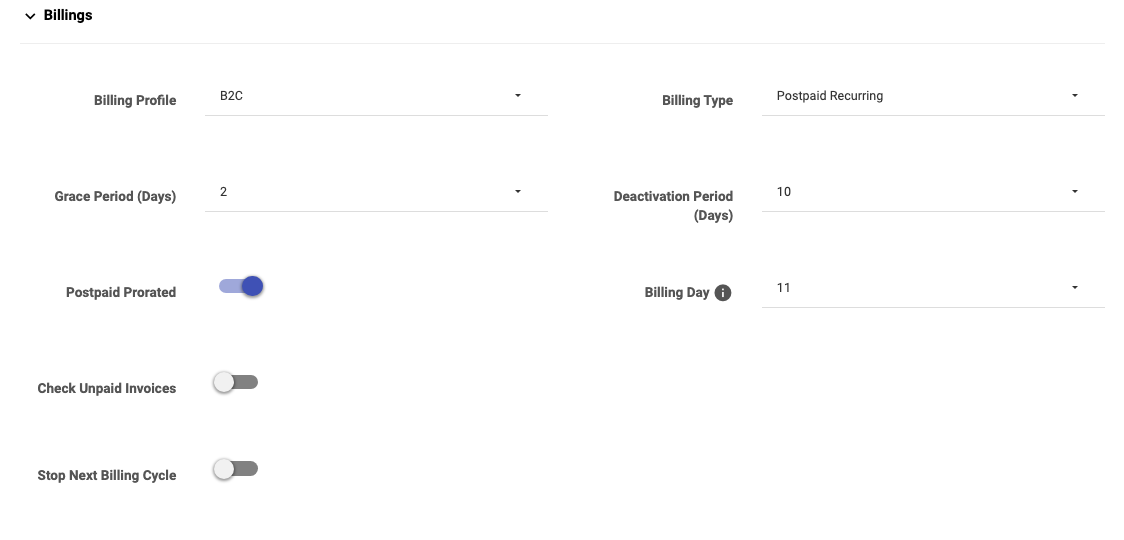
Minimum Balance appears next to Check Unpaid Invoices only when that toggle is on (it's off in the screenshot above).
Activate the cycle first
When you create a postpaid subscriber, you must activate the billing cycle once — from the profile, Recharge ▾ → Activate. After that first activation the cycle runs automatically every period until the subscriber is deactivated. (Activate uses the same invoicing dialog as a recharge, with the pro-rated first amount worked out for you.)
The billing day and the cycle dates
The Billing Day is the date each month invoices are created; it also marks the start of the cycle. From it, the four key dates follow:
- Start Date = the billing day.
- End / Due Date = the day before the next billing day (cycle end).
- Disconnection Date = End Date + Grace Period (Days).
- Deactivation Date = Disconnection Date + Deactivation Period (Days).
Worked example (from the Billing Day help): Billing Day 14, Grace 7, Deactivation 5:
| Date | Value |
|---|---|
| Start Date | 14 March — cycle begins |
| End Date | 13 April — cycle ends |
| Disconnection Date | 20 April — cut off after the 7-day grace |
| Deactivation Date | 25 April — account deactivated after the 5-day deactivation period |
Proration: the first cycle
Postpaid Prorated decides how the first (partial) cycle is handled when a customer is onboarded partway through the period. The examples below all use Grace Period = 7, Deactivation Period = 15, onboarding on 12 June 2026.
Prorated ON, Billing Day = 1st
The first bill covers only the part-month up to the cycle end, then normal full months follow.
| Date | Value |
|---|---|
| Start Date | 12-06-2026 |
| End / Due Date | 30-06-2026 (up to the day before the 1st) |
| Disconnection Date | 07-07-2026 (End + 7) |
| Deactivation Date | 22-07-2026 (Disconnection + 15) |
From the next cycle it bills a full month, 1st → last day.
Prorated ON, Billing Day = 25th
Same onboarding (12th), but the billing day is the 25th, so the first (part) bill runs up to the day before the 25th:
| Date | Value |
|---|---|
| Start Date | 12-06-2026 |
| End / Due Date | 24-06-2026 |
Then it bills 25th → 24th each month.
Prorated OFF
No part-month. The first cycle is a full month from the onboarding date, and the billing day is set to the onboarding date:
| Date | Value |
|---|---|
| Start Date | 12-06-2026 |
| End / Due Date | 11-07-2026 |
Notes from the system (Billing Day help):
- When Postpaid Prorated is disabled, the billing day for the first recharge is set to the current (onboarding) date.
- If the first recharge falls on the 29th, 30th or 31st, the billing day is set to the 28th (so every month has that day).
Unpaid-invoice handling (auto cut-off)
Whether an unpaid customer is renewed or held is controlled by Check Unpaid Invoices (with Minimum Balance):
- Check Unpaid Invoices — OFF: the cycle renews regardless of what's owed.
- Check Unpaid Invoices — ON: before renewing, the system checks for past-due amounts. If the customer owes more than the tolerance, it does not renew the next cycle and instead waits until the Disconnection Date.
- Minimum Balance: the tolerable outstanding amount allowed when Check Unpaid Invoices is on. Owe up to this and you're still renewed; owe more and the renewal is held. (Set it to
0to require full payment.)
Disconnection and deactivation
- Disconnection Date — the internet is cut off, but the account and its cycle still exist (the customer can be brought back by paying).
- The system then waits until the Deactivation Date, effectively holding the same cycle open.
- Deactivation Date — if still unresolved, the billing cycle is stopped. On deactivation the system adjusts the last invoice and adds the days the customer used during the grace period so the final bill is accurate.
- After deactivation, if the customer returns, their service starts from scratch (a fresh cycle via Activate).
Stop Next Billing Cycle
Stop Next Billing Cycle (Settings tab, or Other Actions ▾) tells the system not to renew this subscriber from the next cycle onward — the current cycle finishes, then billing stops. Use it for a customer who's leaving at period end.
Adjust Billing Dates (manual)
If you need to set a postpaid subscriber's dates by hand — after a migration, a dispute, or to line them up with a billing run — use Other Actions ▾ → Adjust Billing Dates (Billing Dates):
| Field | Meaning |
|---|---|
| Auto Adjust With | Auto-fill the dates from None, Last month, or Current month. |
| Start Date | The cycle start (recurring start). |
| End Date (Due Date) | Cycle end / due date. |
| Disconnection Date | When service stops if unpaid. |
| Deactivation Date | When the account deactivates. |
Important Notes
- Postpaid must be activated once before it automates — a newly-created postpaid subscriber won't bill until you Activate.
- Grace and Deactivation periods are the buffers between End → Disconnection → Deactivation. Larger values are more forgiving.
- Check Unpaid Invoices + Minimum Balance is your auto cut-off policy — without it, cycles renew even when money is owed.
- Once deactivated, a returning customer starts a new cycle; the old one isn't resumed.
- To change a package on a postpaid subscriber you must deactivate and re-activate — see Changing a Package.