Prepaid (On-Demand)
Overview
Prepaid (also called On-Demand) works like a prepaid mobile SIM: the customer pays before they use the service. The system's job is simple — it watches the plan's expiry and, once it passes, cuts off the internet. Getting back online means recharging.
There are three ways a prepaid subscriber gets renewed:
- Manually by the ISP.
- Self-service by the customer.
- Automatically with Auto Renew.
Plus an optional hybrid arrangement (grace period + temporary suspension) for customers who pay a few days late by agreement.
Set the billing type
On the subscriber's Settings tab, set Billing Type → Prepaid.
1. Manual recharge
By default, prepaid is fully manual. When the plan expires, the customer is cut off, and the ISP recharges them from the profile using Recharge ▾ → Recharge (see Recharge and Renew). Nothing renews on its own.
2. Self-service (customer portal / app)
If Enable UCP is on (Settings tab), the customer can log into the self-care portal or app and recharge themselves online — exactly like topping up a prepaid SIM. The payment and renewal happen without ISP involvement.
3. Auto Renew
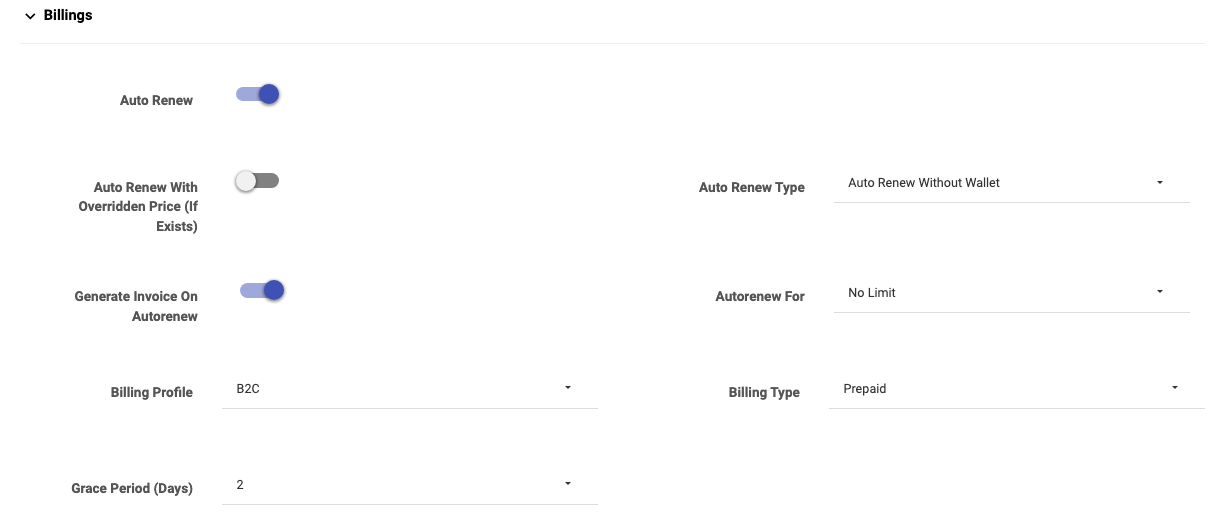
To automate prepaid renewals, turn on Auto Renew on the Settings tab. The related options let you control exactly how it behaves:
| Option | What it does |
|---|---|
| Auto Renew | Turns on automatic renewal at expiry. |
| Auto Renew Type | Auto Renew Without Wallet — renew regardless; or Auto Renew With Wallet — renew only if the customer has enough wallet balance (otherwise it waits). |
| Auto Renew With Overridden Price (If Exists) | Renew at the subscriber's overridden/last price instead of the plan's list price. |
| Generate Invoice On Autorenew | Raise an invoice automatically on each renewal. |
| Autorenew For | How many times to auto-renew: No Limit, or a fixed count (1–48). After the count is reached, auto-renew stops and the customer becomes manual again. |
Common set-ups
- "Renew only if they've paid into their wallet" → Auto Renew on, Auto Renew Type = With Wallet. The plan renews itself whenever the customer has topped up enough balance, and waits when they haven't.
- "Auto-renew for 6 months then review" → Auto Renew on, Autorenew For = 6.
4. Hybrid: grace period + temporary suspension
Pure prepaid cuts off exactly at expiry. But you can support a customer commitment ("I'll pay within 7 days") without switching to postpaid — a light hybrid that is not pure prepaid and not pure postpaid.
How to enable it

- In Config → Site, turn on Allow Temporary Subscriber Suspended (this is a site-wide switch).
- On the subscriber, set a Grace Period (Days) matching the agreed commitment (e.g. 7).
How it behaves
- When the customer has an amount due after the due date, the system temporarily suspends them (pauses the connection) — it does not terminate them.
- When the customer clears the due, the system automatically removes the suspension and they're back online.
- If the customer asks for more time, the ISP can extend the due date (Billing Dates → Change Due Date).
Important: this hybrid only pauses/resumes based on the due amount — it does not touch the service's expiry / end date. The plan's validity is unchanged; you're only gating access on payment of the agreed commitment.
Important Notes
- Auto Renew With Wallet protects you from renewing customers who haven't paid — it simply waits until there's balance.
- Autorenew For is a safety limit; once it's exhausted the subscriber reverts to manual renewal.
- The temporary suspension hybrid needs the site-wide switch in Config → Site first; the per-subscriber Grace Period then sets how long the commitment lasts.
- Temporary suspension is reversible and automatic — it is not the same as Terminate.
Common Mistakes
- Expecting Auto Renew to charge a card — it renews (optionally from wallet); online card payment is the customer's self-service action.
- Setting a grace period for a prepaid customer but forgetting to enable Allow Temporary Subscriber Suspended site-wide, so nothing suspends.
Related Guides
- Postpaid (Recurring)
- Recharge and Renew
- Billing Dates (extend a due date)
- Status Changes (Suspend)