Find Subscribers
Overview
The Find Subscriber page is an advanced search. Where the list's Search box matches a word across the visible columns, Find lets you combine many precise filters — for example "all Prepaid subscribers in Zone North whose plan has expired and who have auto-renew off" — and then act on the results in bulk.
Who Can Use This Feature
Staff running targeted searches, clean-ups or campaigns.
Required Permissions
- Subscriber → Find.
Navigation
Subscribers → Find Subscriber
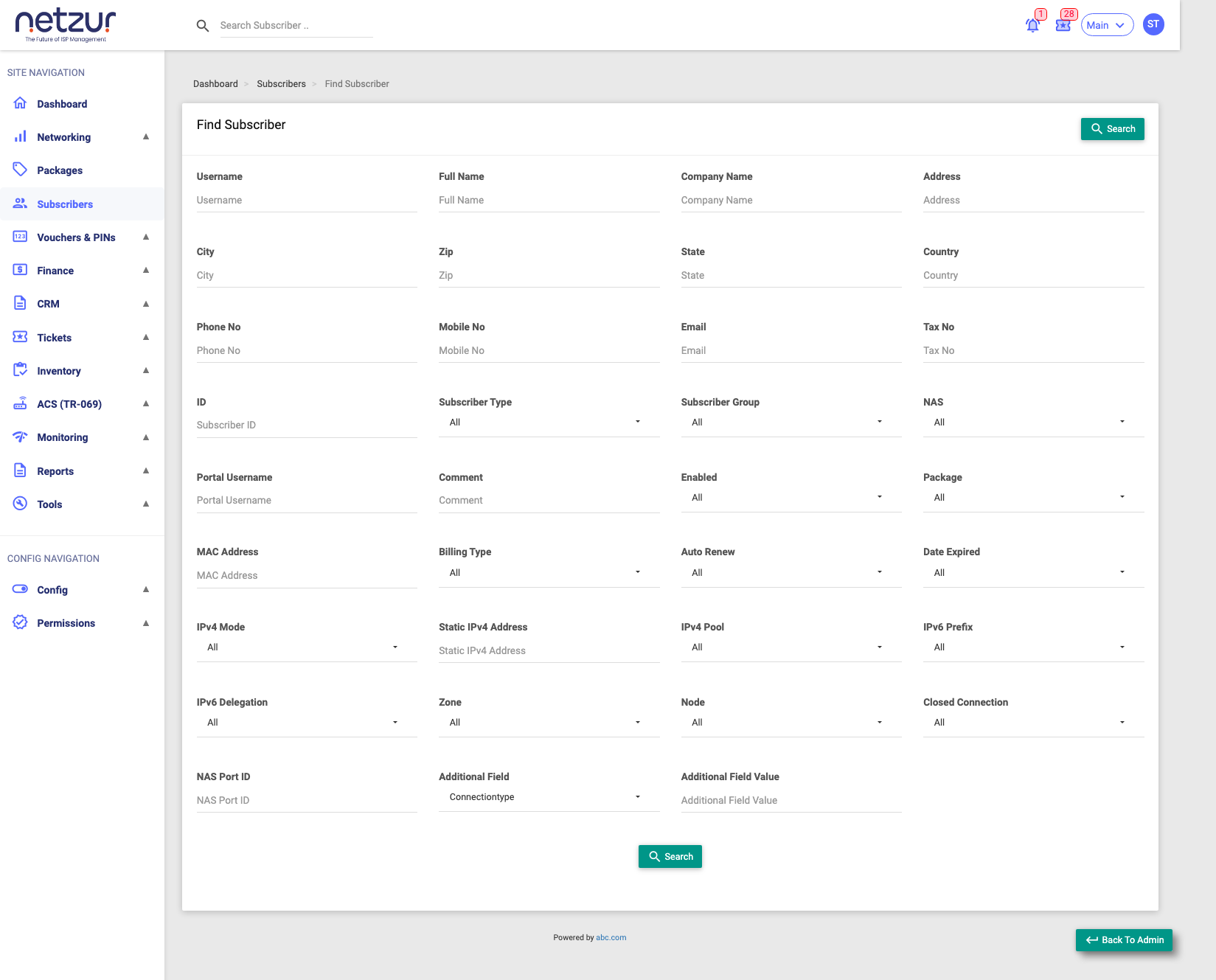
How to Use
- Go to Subscribers → Find Subscriber.
- Fill in only the filters you care about — blank filters are ignored.
- Select Search.
- The results appear in a table that works just like the main list — including the checkbox bulk actions, Column chooser and Export.
Search Filters
You can combine any of these:
Identity & contact
| Filter | Matches |
|---|---|
| Username / Portal Username | The connection or portal login. |
| Full Name / Company Name | The customer's name or business. |
| Email / Phone No / Mobile No | Contact details. |
| Tax No | The tax/GST number. |
| ID | The internal subscriber ID. |
| Address / City / Zip / State / Country | Location fields. |
| Comment | Text in the internal comment. |
Plan & billing
| Filter | Options |
|---|---|
| Package | Any package. |
| Sub Group | Any subscriber group. |
| Billing Type | Prepaid / Postpaid (Recurring). |
| Auto Renew | Yes / No. |
| Date Expired | Yes / No (plan already expired). |
| Enabled | Yes / No. |
Connection & network
| Filter | Options |
|---|---|
| Sub Type | Regular / MAC / Lease. |
| NAS | Any NAS device. |
| NAS Port ID | Exact port/interface. |
| MAC Address | Exact MAC. |
| Zone / Node | Any zone / node. |
| Closed Connection | Yes / No. |
| IPv4 Mode | None / Static IP. |
| Static IPv4 Address / IPv4 Pool | A specific IP or pool. |
| IPv6 Prefix / IPv6 Delegation | Enabled Yes / No. |
Custom fields
| Filter | Matches |
|---|---|
| Additional Field + Value | Any custom field you've configured, matched to a value. |
The results table
The results share the main list's Action (bulk) menu, Column chooser and Export. The Find results can show an even wider set of columns than the main list (contract dates, billing profile, grace/deactivation periods, wallet/ledger balance, KYC/verification flags, IPTV/OTT pack, FUP policy, and more) — use Column to show what you need.
What Happens Next
Nothing changes until you act. From the results you can open any subscriber's profile, or select rows and use bulk actions — for example bulk-renew everyone whose plan expired today.
Important Notes
- Blank filters are ignored, so start broad and narrow down.
- Find is read-only until you deliberately run a bulk action on the results.
Common Mistakes
- Expecting partial matches on dropdown filters — dropdowns match exactly.
- Forgetting a leftover filter from a previous search; clear fields you don't want.