CPE tab
Overview
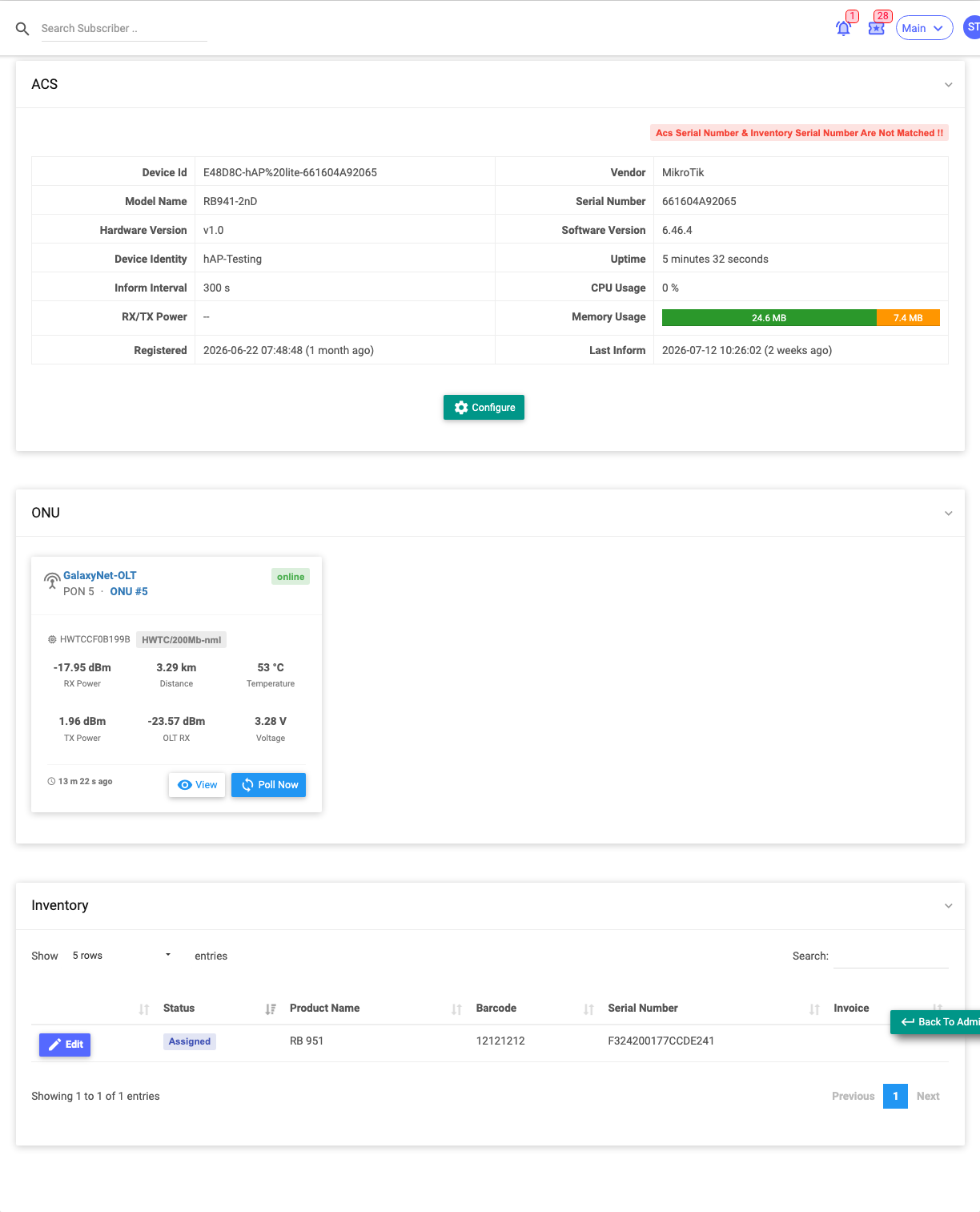
CPE stands for Customer-Premises Equipment — the hardware at the customer's home or office. This tab brings together the subscriber's ACS/TR-069 device, their ONU (fibre unit), and any inventory items assigned to them, so you can see and diagnose their equipment in one place.
Required Permissions
- Subscriber → Show (CPE view). ONU polling and ACS configuration have their own permissions.
Navigation
Subscribers → (open a subscriber) → CPE
ACS (TR-069) device
If the subscriber has a managed router registered with the ACS, its live details show here:
Device ID, Vendor, Model, Serial Number, Hardware/Software Version, Device Identity, Uptime, Inform Interval, CPU Usage, RX/TX Power, Memory Usage, Registered date, and Last Inform time.
- A warning appears if the ACS serial doesn't match the inventory serial.
- Configure opens the device's ACS settings.
ONU (fibre)
For fibre customers, each assigned ONU shows as a card with its OLT, PON id, ONU number and a status badge (Online / Low signal / Offline), plus optical stats: RX Power, TX Power, OLT RX, Distance, Temperature, Voltage, serial/MAC, vendor/model and last-seen time.
- View opens the ONU details; Poll Now re-reads the ONU's live data.
Inventory
Equipment issued to the subscriber from stock:
| Column | Meaning |
|---|---|
| Status | Rented / Sold / Assigned. |
| Product Name / Barcode / Serial Number | The item. |
| Invoice | The linked invoice, if any. |
Select Edit on a row to open the inventory item.
CPE Information (notes)
Alongside the live equipment data, you can record free-text CPE notes about the customer's hardware (router model, ONU serial, installation notes). From the profile:
- Other Actions ▾ → Add CPE Information — add a note.
- Other Actions ▾ → List CPE Informations — view the notes already recorded.
| Field | Description |
|---|---|
| CPE Information | The note text. |
| Remark | Audit note. |
These are internal notes specific to the equipment — for general subscriber notes use General Notes instead.
Important Notes
- Panels only show data if the subscriber actually has an ACS device / ONU / assigned inventory.
- RX/TX power on the ONU is the first thing to check for a fibre customer reporting slowness or drops (very low RX power = signal problem).
- Add CPE notes with the Add CPE Information action (see above).
Related Guides
- Technical Info tab
- ACS (TR-069) module (coming soon)
- Inventory module (coming soon)