Finance tab
Overview
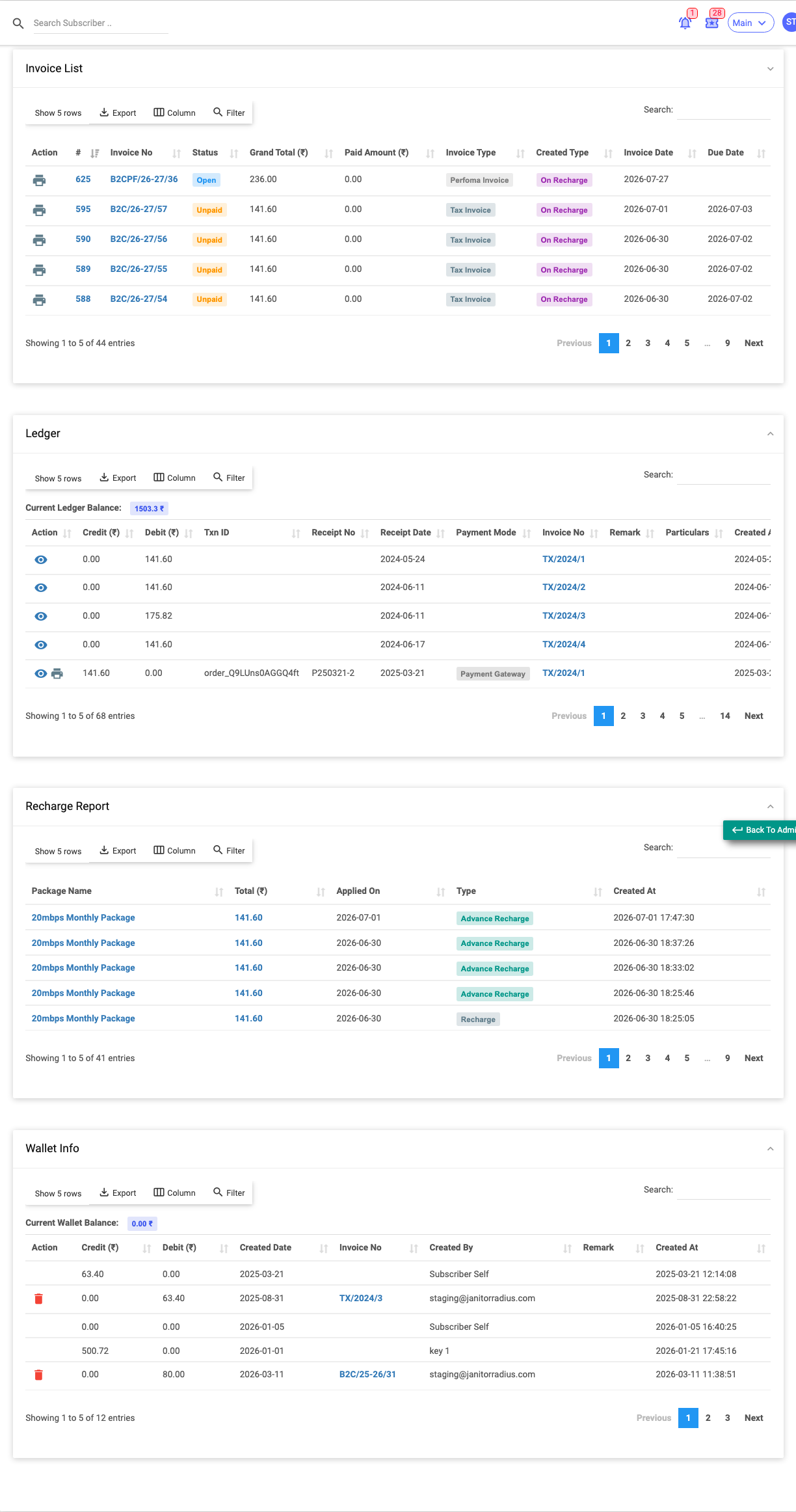
The Finance tab is the subscriber's money history in one place: their invoices, their ledger (receipts/payments), their recharge history, and their wallet activity. It's read-only reporting — you create invoices and payments from the header actions (Invoices & Payments), and they appear here.
Required Permissions
- Subscriber → Show (finance view). Row actions depend on invoice/payment permissions.
Navigation
Subscribers → (open a subscriber) → Finance
Invoice List
Every invoice raised for the subscriber.
| Column | Meaning |
|---|---|
| Invoice No | The invoice number. |
| Status | Paid / unpaid / partially paid. |
| Subtotal, Discount Amount, Taxable Amount, Total Tax, Grand Total, Paid Amount | The money breakdown. |
| Invoice Type / Created Type | How the invoice arose (recharge, custom, auto-renew…). |
| Invoice Date / Due Date | Dates. |
| Comment / Rollback Comment | Notes. |
| Created / Updated By | Who raised or changed it. |
Row actions (in the Action column) let you view, pay, convert to a tax invoice, or roll back an invoice, subject to permission.
Ledger
The running account of receipts and adjustments, carrying the subscriber's ledger balance.
| Column | Meaning |
|---|---|
| Credit / Debit | Amount in or out. |
| Txn ID / Receipt No / Official Receipt No / Ack No | References. |
| Receipt Date / Payment Mode | When and how. |
| Invoice No | The invoice it settles. |
| Bank Name / Remark / Particulars | Details. |
Recharge Report
A simple history of plan recharges:
| Column | Meaning |
|---|---|
| Package Name | The plan recharged. |
| Total | Amount. |
| Applied On | When it took effect. |
| Type | Recharge / advance / renewal. |
Wallet Info
The subscriber's prepaid wallet movements, carrying the wallet balance:
| Column | Meaning |
|---|---|
| Credit / Debit | Money added to or spent from the wallet. |
| Created Date | When. |
| Invoice No | Any linked invoice. |
| Remark / Created By | Details. |
Important Notes
- The Wallet and Unpaid figures here match the KPI boxes in the header.
- To take money or raise a bill, use Add Payment / Add Invoice — see Invoices & Payments.