Settings tab
Overview
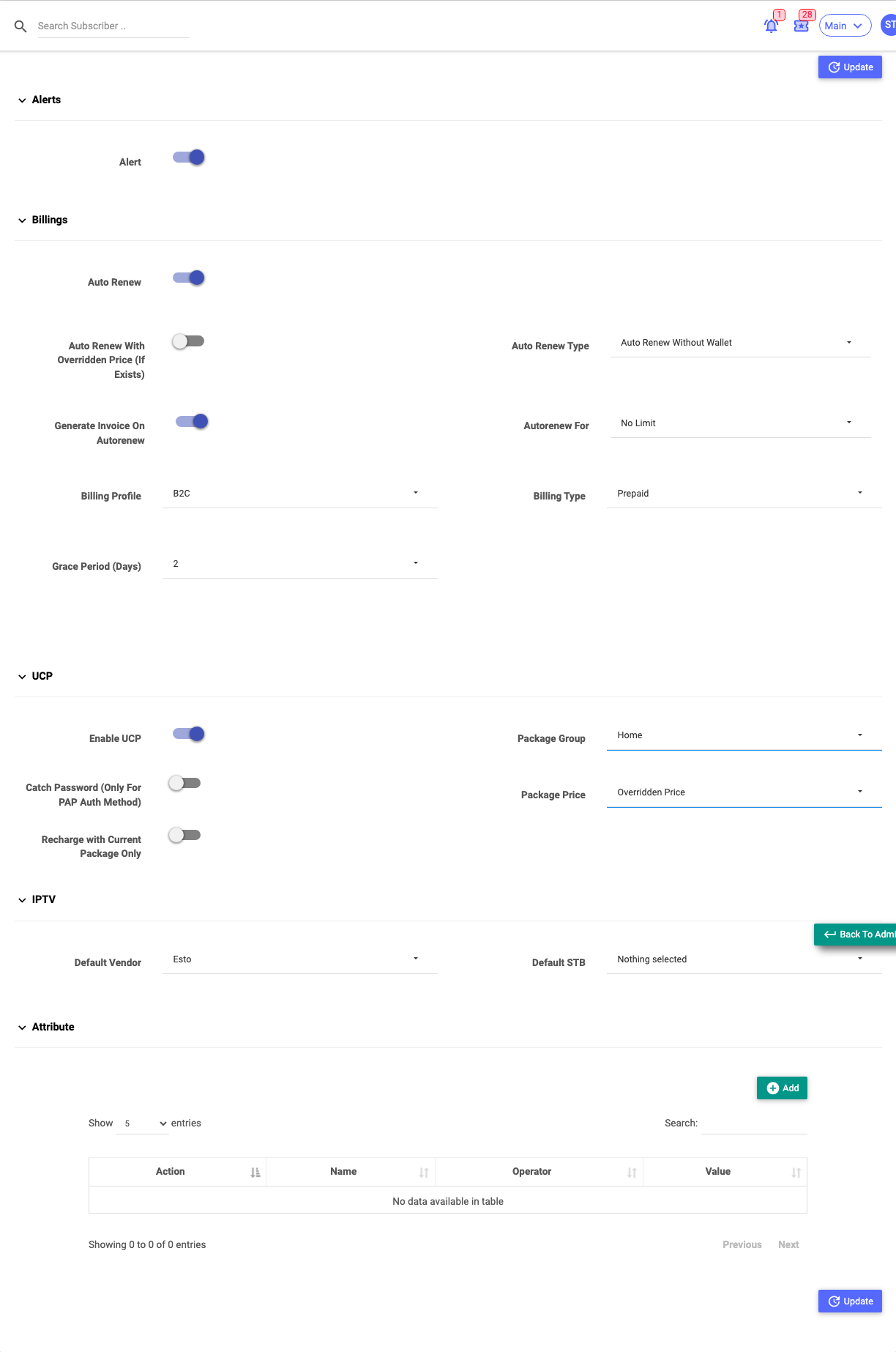
The Settings tab controls how the subscriber is billed and served over time: alerts, auto-renew and billing behaviour, the self-care portal (UCP), IPTV defaults, and any custom RADIUS attributes attached to this one subscriber.
Required Permissions
- Subscriber → Update Settings.
Navigation
Subscribers → (open a subscriber) → Settings
Alerts
| Field | Description |
|---|---|
| Alert | Turn expiry/usage alerts on for this subscriber. |
Billings
| Field | Description |
|---|---|
| Auto Renew | Automatically renew the plan at expiry. |
| Auto Renew With Overridden Price (If Exists) | Renew using this subscriber's overridden/last price rather than the list price. |
| Auto Renew Type | Auto Renew Without Wallet or With Wallet. |
| Generate Invoice On Autorenew | Raise an invoice each auto-renewal. |
| Autorenew For | How many times to auto-renew (No Limit, or 1–48). |
| Billing Profile | The billing profile applied. |
| Billing Type | Prepaid or Postpaid (Recurring). |
| Grace Period (Days) | Days of grace after the due date before disconnection (postpaid). |
| Deactivation Period (Days) | Days after disconnection before the account deactivates (postpaid). |
| Postpaid Prorated | Pro-rate the first postpaid bill to the billing day. |
| Billing Day | Day of the month the cycle bills on (postpaid). |
| Check Unpaid Invoices | Before renewing, check for past-due invoices; if any (beyond the tolerance), hold the renewal. |
| Minimum Balance | The tolerable outstanding balance allowed when Check Unpaid Invoices is on. |
| Stop Next Billing Cycle | Stop renewing this subscriber from the next cycle. |
The billing fields above drive the whole subscriber lifecycle. For how they work together — cycles, dates, disconnection, deactivation — see Billing & the Subscriber Lifecycle.
UCP (self-care portal)
| Field | Description |
|---|---|
| Enable UCP | Give the customer access to the self-care portal. |
| Catch Password (Only For PAP Auth Method) | Capture the connection password for portal display/use (PAP only). |
| Recharge with Current Package Only | Limit the customer to renewing their current plan. |
| Package Group | Which package group the customer may choose from in the portal. |
| Package Price | Show the plan's Native price or the Overridden Price. |
IPTV
| Field | Description |
|---|---|
| Default Vendor | The default IPTV vendor for this subscriber. |
| Default STB | The default set-top box. |
Attribute (per-subscriber RADIUS attributes)
A table of extra RADIUS attributes applied to this subscriber only (Name, Operator, Value) — the same idea as package custom attributes, but scoped to one person. Select Add to attach one; edit/delete from the row actions. These are advanced and vendor-specific.
Saving
Select Update to apply. Billing changes can affect the next renewal, so review them before saving.
Important Notes
- Auto Renew with wallet will draw real balance at renewal — make sure that's intended.
- Switching Billing Type changes how and when the subscriber is billed.
- Per-subscriber attributes override or add to the package's attributes for this subscriber only.