Technical Info tab
Overview
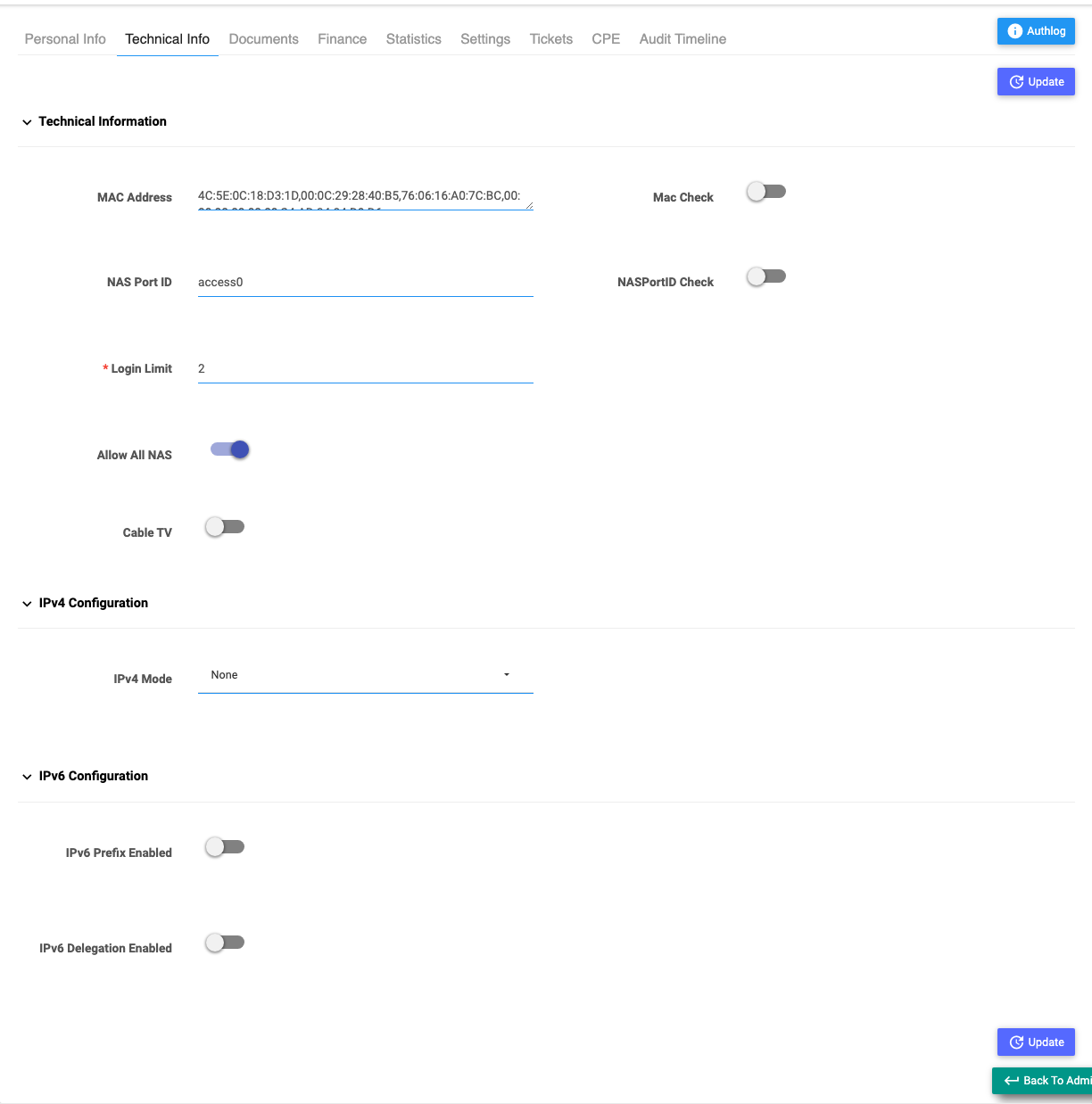
The Technical Info tab controls how the subscriber connects to the network — their MAC/port binding, how many simultaneous logins they get, which NAS (and OLT) they're allowed on, and any static IPv4/IPv6 addressing.
Required Permissions
- Subscriber → Update Technical Info. Individual rows also depend on finer permissions (reset MAC, reset NAS Port ID, login limit, change NAS, IPv4/IPv6 config).
Navigation
Subscribers → (open a subscriber) → Technical Info
Technical Info
| Field | Description |
|---|---|
| MAC Address | The device MAC(s) bound to this subscriber. |
| Mac Check | When on, the subscriber may only connect from the bound MAC. |
| NAS Port ID | The port/interface the subscriber is tied to. |
| NASPortID Check | When on, enforce that the subscriber uses that exact port. |
| Login Limit | How many simultaneous sessions are allowed (minimum 1). |
| Allow All NAS | When on, the subscriber can connect through any NAS. When off, choose the specific NAS(es) in Select NAS. |
| Select NAS | The NAS device(s) this subscriber may use (shown when Allow All NAS is off). |
| Cable TV (CATV) | Marks the subscriber as a cable/fibre-TV customer (only if that module is on); reveals Select OLT. |
| Select OLT | The OLT device(s) for a CATV subscriber. |
IPv4 Configuration
(For Regular/MAC subscribers.)
| Field | Description |
|---|---|
| IPv4 Mode | None (dynamic) or Static. |
| IPv4 Expiry Date | When a static assignment lapses (Static mode). |
| Static IPv4 Pool | The pool the fixed IP comes from. |
| Static IPv4 Address | The specific fixed IP (from the pool's free addresses). |
IPv6 Configuration
| Field | Description |
|---|---|
| IPv6 Prefix Enabled | Give the subscriber an IPv6 prefix. |
| IPv6 Prefix Pool / Prefix / Expiry | The pool, the specific prefix, and when it lapses. |
| IPv6 Delegation Enabled | Give the subscriber a delegated IPv6 block. |
| IPv6 Delegation Pool / Delegation / Expiry | The pool, the specific delegation, and its expiry. |
Saving
Select Update to apply. Changes take effect on the subscriber's next session (you may need Reset MAC or a reconnect for some changes to bite).
Important Notes
- Turning on Mac Check / NASPortID Check locks the subscriber to that device/port — handy against sharing, but it blocks them if their hardware changes.
- Static IPv4/IPv6 needs free addresses in the chosen pool.
- Allow All NAS off + no NAS selected means the subscriber can't connect anywhere — always pick at least one.
Related Guides
- Auth Log — if a subscriber can't connect, check whether their login is being accepted or rejected
- Reset MAC & NAS Port
- Override Bandwidth
- Personal Info tab