Business Types & Reseller Billing
Overview
Every site has one business type, set from the site header with Change Business Type. It decides three things: whether the site makes its own packages, whether it keeps a prepaid balance with you (the ISP), and how money is settled between the site and you.
| Type | Makes own packages? | Prepaid balance with ISP? | How the ISP earns |
|---|---|---|---|
| Non-Reseller | ✅ Yes | ❌ No | Nothing is settled — the site runs independently. |
| Reseller | ❌ No (you share them) | ✅ Yes (top-up) | The site price is deducted from the reseller's balance on each recharge. |
| Partnership | ❌ No (you share them) | ❌ No | Each payment is split by a percentage and recorded in a report. |
Non-Reseller
A Non-Reseller site runs on its own. It creates its own packages, sets its own prices, and keeps everything its subscribers pay. There is no balance with the ISP, no top-up, and nothing is deducted when it recharges a subscriber. This is the type for a site you operate directly.
Reseller
A Reseller is a partner who sells your service under a prepaid arrangement. Two rules define it:
- A reseller cannot create packages — you share yours down to them (the Add Package screens are blocked for reseller sites).
- A reseller keeps a prepaid Site Balance with you, and each recharge deducts from it.
Sharing packages to a reseller
Open the reseller site and use Share Package (in the site header), or the site's Shared Packages tab. You pick packages and set three prices per package:
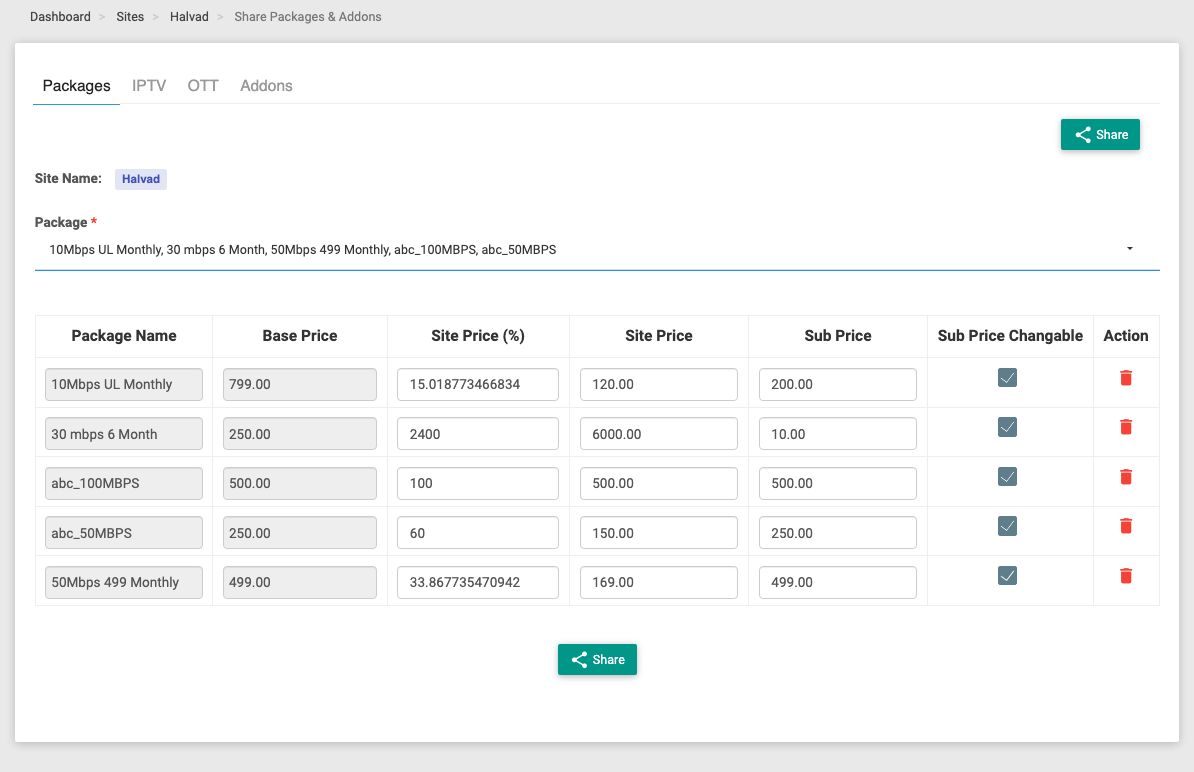
| Column | Meaning |
|---|---|
| Base Price | (read-only) Your own catalogue price for the package — the reference the percentage is worked out against. |
| Site Price (%) | The site price expressed as a percentage of the base price (a convenience — type either the % or the amount). |
| Site Price | What the reseller pays you — their wholesale cost. This is the amount deducted from the reseller's balance on each recharge. |
| Sub Price | What the subscriber pays the reseller — the retail price. |
| Sub Price Changable | If ticked, the reseller may change the subscriber (retail) price themselves. |
The reseller's margin on a sale is Sub Price − Site Price.
Topping up the reseller's balance
A reseller must keep enough balance to cover recharges. It can be topped up two ways:
- The reseller pays online themselves — from their own portal, the Site Balance indicator (top bar) has an Add Balance option that takes an online payment.
- You add it from the Admin panel — open the site and use Add Balance (amount, payment mode, proof upload, remark). You can also Deduct Balance. Every movement is recorded on the site's Reseller Report tab and its Audit Timeline.
The reseller's portal shows the balance in green when positive and red when low.
What gets deducted on a recharge
When the reseller recharges a subscriber, their balance is debited by:
Site Price × quantity (plus tax, depending on the tax setting below)
If the balance can't cover it, the recharge is refused with an insufficient site balance message. The subscriber still pays the Sub Price; the reseller keeps the difference as margin.
Who keeps the tax — the tax setting
On a reseller/partnership site's General tab there are two related switches:
- Use Admin Payment Gateway — whether the subscriber's online payments go to your (the ISP's) gateway or the reseller's own.
- Tax Setting On Admin Payment Gateway — Tax Added To Admin or Tax Added To Operator. This decides whether the tax is passed to you or kept by the reseller.
Take a package with Subscriber Price ₹100 + 18% tax = ₹118, shared at Site Price ₹40 (margin ₹60):
| Tax setting | Deducted from reseller on recharge | Why |
|---|---|---|
| Tax Added To Operator | ₹40 | Only the site price. The reseller keeps the ₹18 tax it collected. |
| Tax Added To Admin | ₹40 + ₹18 = ₹58 | Site price plus tax. The tax is passed through to you. |
Online payments: own gateway vs. your gateway
What happens when the subscriber pays online depends on the Use Admin Payment Gateway switch:
Reseller uses their own gateway (switch OFF) — the subscriber's money lands directly in the reseller's own gateway account. Nothing else happens: only the site price was debited at recharge, so the reseller simply keeps the payment. Net result = their margin (and the tax too, if Tax Added To Operator).
Reseller uses your gateway (switch ON) — the subscriber's money lands in your gateway account, so the system credits the reseller's balance with the payment to settle up. Because the site price was already debited at recharge time, the reseller ends up with their share:
| Tax setting | Net credited to reseller's balance | Made up of |
|---|---|---|
| Tax Added To Operator | ₹78 | margin ₹60 + tax ₹18 |
| Tax Added To Admin | ₹60 | margin ₹60 (you keep the ₹18 tax) |
:::note Recharge now, pay the due later If the recharge is done from the reseller's portal, the deduction is settled at that moment. If the subscriber later clears the outstanding due online through your gateway, that payment is then credited to the reseller's balance (a single credit, only for a sale that was already settled). If they instead pay through the reseller's own gateway, the money just arrives in the reseller's own account — no crediting step is needed. :::
Partnership
A Partnership site is also sold your shared packages and cannot create its own, but it works on revenue share rather than a prepaid balance:
- There is no balance and no top-up.
- Each package is shared at a single price (the subscriber price equals the site price — there's no wholesale/retail spread), and the money is divided by the site's Partnership Rate (a percentage set with Change Partnership Rate).
- On every paid invoice the system records a split:
- Site Share = invoice total × partnership rate %
- Admin Share = the remainder (your cut)
- The total used is the pre-tax subtotal, or the tax-inclusive total if Divide Share With Tax is on.
- Nothing is deducted from anyone. The splits simply accumulate in the Partnership Report, which you use to settle with the partner outside the system.
So a partnership site is essentially a reporting arrangement: it tracks how much of each subscriber's payment belongs to the partner versus to you.
Changing a site's business type
You switch a site between types with Change Business Type in the site header. What the dialog asks for depends on the direction — because moving into Reseller or Partnership means the site can no longer use its own packages, so its existing packages and subscribers must be mapped onto your shared packages.
:::caution Set the billing profile first Whichever direction you convert, the site must have a default billing profile assigned (site → Config → Billing → Billing Profile). Recharging needs one — without it the system refuses with "Please set billing profile". Confirm the billing profile is in place before converting, so recharges keep working afterwards. :::
Non-Reseller → Reseller (or Partnership)
Converting a Non-Reseller site is the involved direction, because its own packages don't exist for a reseller. The dialog shows a Package Mapping table that you must complete:
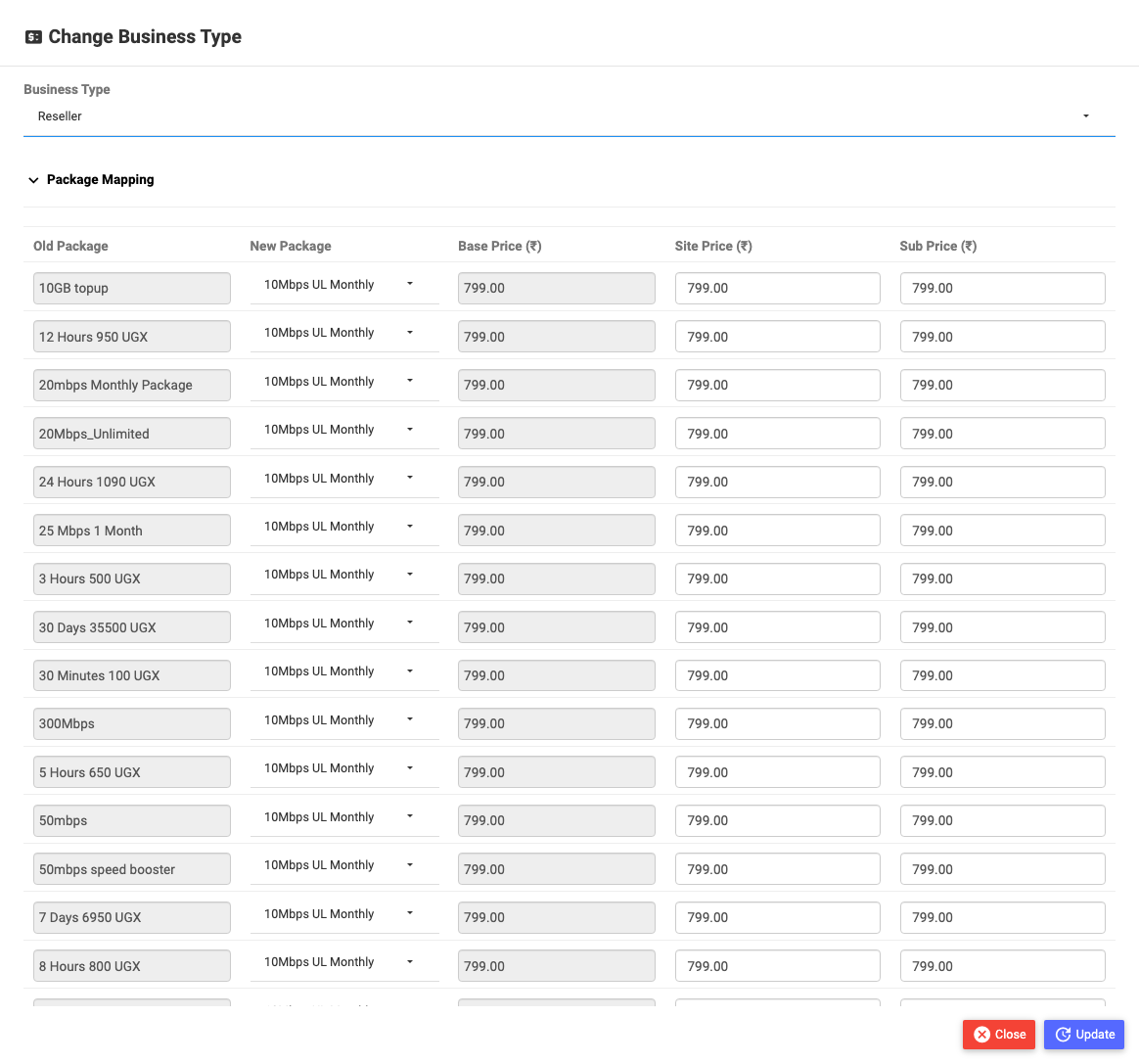
For every one of the site's current packages (Old Package) you pick a New Package from your shared catalogue, and set its Site Price (what the reseller pays you) and Sub Price (what the subscriber pays); Base Price fills in from your catalogue automatically.
When you click Update, the system:
- Creates/updates the shared pricing (Site Price + Sub Price) for each chosen package on this site.
- Moves every subscriber off the old package onto the mapped new package (their FUP counters are reset).
- Switches the site's type and returns you to its General tab.
If you're converting to Partnership, the dialog also asks for the Partnership Rate (%) — it must be greater than zero.
:::caution Mapping is mandatory Map every old package to a shared one before saving. A subscriber left on an unmapped package would have no valid plan or pricing on the reseller/partnership site. Also remember a new reseller needs a top-up balance before it can recharge anyone. :::
Reseller (or Partnership) → Non-Reseller
Converting back is simpler. The dialog shows only the Business Type selector and a Remark — there's no package-mapping table:
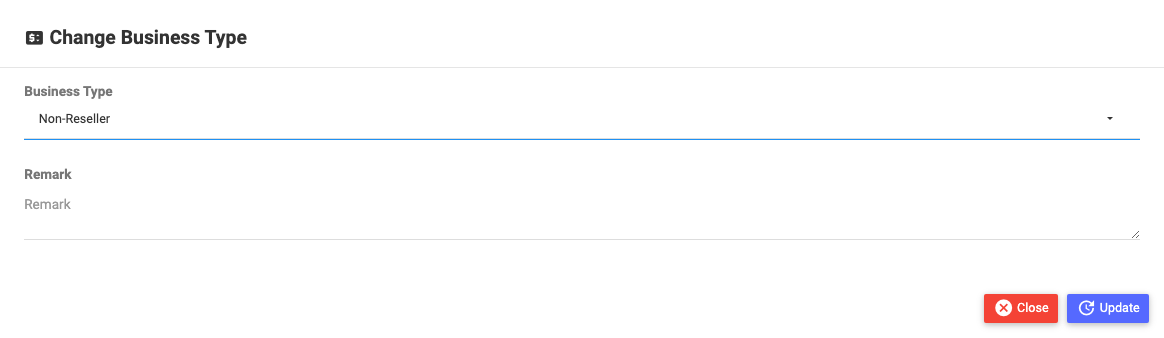
On Update, the site becomes Non-Reseller: it stops settling against a balance (nothing is deducted on future recharges) and it can now create its own packages again. Existing subscribers keep the package they're on. As always, make sure the site still has a valid billing profile.
Every business-type change asks for a Remark and is recorded on the site's Audit Timeline.
At a glance
| Non-Reseller | Reseller | Partnership | |
|---|---|---|---|
| Creates own packages | Yes | No (shared) | No (shared) |
| Prepaid balance / top-up | — | Yes | — |
| On recharge | nothing deducted | site price (± tax) deducted from balance | split recorded, nothing deducted |
| Subscriber pays | site keeps it | sub price (margin = sub − site) | — |
| Settled by | — | balance debit, + credit-back if your gateway | percentage split report |
| Report | — | Reseller Report | Partnership Report |
Related Guides
- Site Management — sharing packages, per-site actions, and the Reseller/Partnership Report tabs
- Super Admin overview