PINs Overview
Overview
A PIN (Recharge PIN) is a scratch-card code that an existing subscriber redeems to top up their own account — exactly like a mobile recharge card. Each PIN carries a package; when the customer enters it (in their self-care portal/app), that package is applied to their account and the PIN is marked used, recording who redeemed it and when.
Unlike a voucher (which is an account), a PIN recharges an account that already exists. PINs are generated in series (batches) and usually printed as scratch cards to sell.
Who Can Use This Feature
ISPs and resellers who sell recharge cards for existing customers.
Required Permissions
- PIN → List to view; Add / Find / Generate PDF / Delete / Update for those actions.
Navigation
Vouchers & PINs → PINs
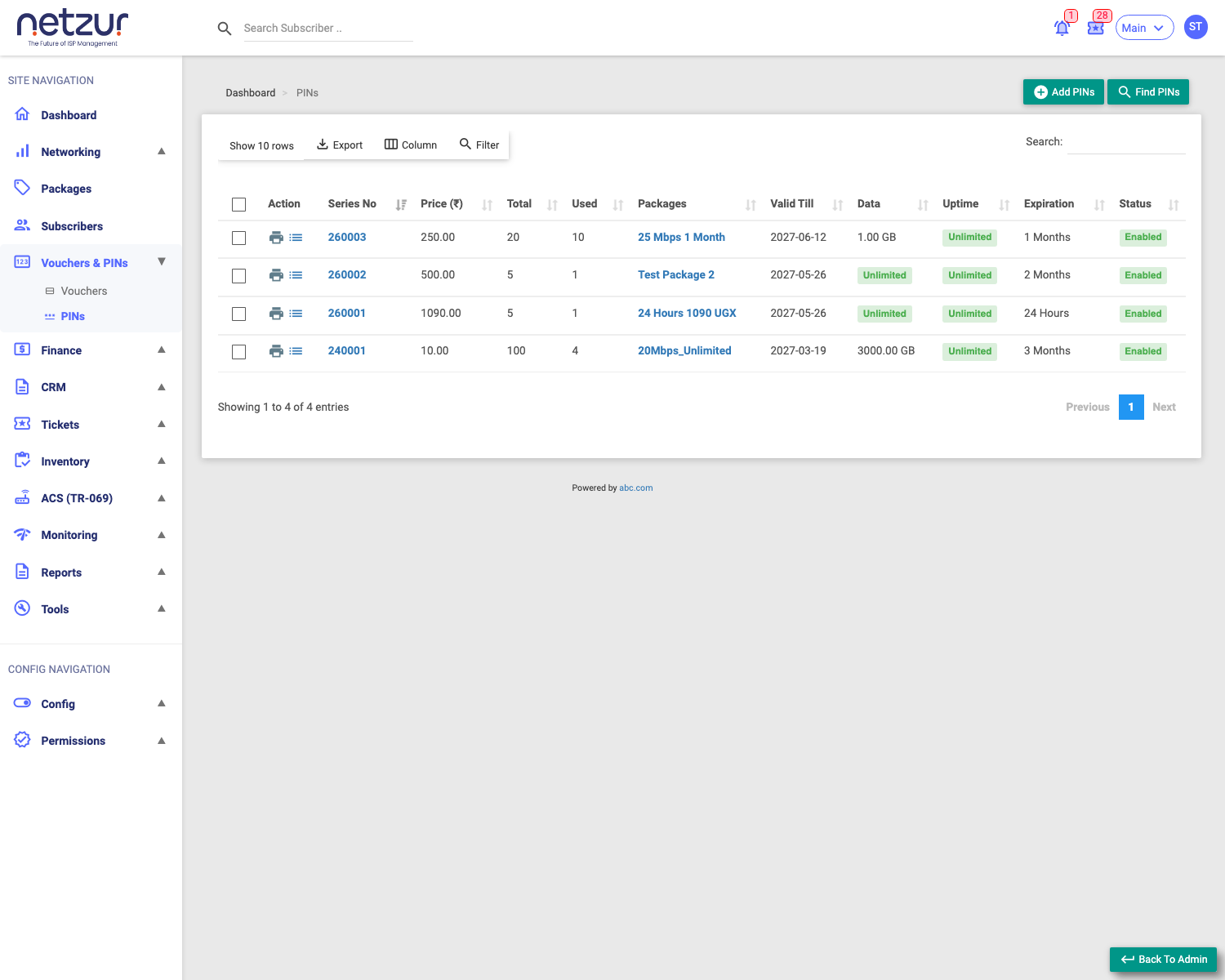
The PIN Series list
Each row is one series (batch):
| Column | Meaning |
|---|---|
| Action | Print (generate the scratch-card PDF) and Pin List (view the individual PINs). |
| Series No | The batch number (links to edit the series). |
| Price | The package price per PIN. |
| Total | How many PINs are in the series. |
| Used | How many have been redeemed. |
| Packages | The plan each PIN grants. |
| Valid Till | The deadline to redeem the PINs. |
| Data / Uptime / Expiration | The package's allowances (or Unlimited). |
| Status | Enabled / Disabled. |
Above the list: Add Pin, Find Pin, and Export / Column / Filter / Search. Tick rows to reveal the bulk Delete action.
What you can do here
- Add a PIN Series — generate a new batch of recharge codes.
- Find PINs — search for a PIN or see used/unused ones.
- Print (Action column) — download the scratch-card PDF of unused PINs (see Printing the PINs below).
- Pin List (Action column) — open the PINs in the series, including who redeemed each.
Printing the PINs (PDF)
The Print icon in the series list's Action column generates a scratch-card PDF — one card per PIN, each showing the PIN code, validity and price, with a scannable QR/barcode. Print and distribute these for customers to redeem.
The PDF includes only unused PINs, so redeemed codes are never reprinted. The file downloads as
Pin Series <site>-<series>.pdf.
Important Notes
- A PIN tops up an existing subscriber — the customer must already have an account to redeem one.
- The series number is generated automatically (e.g.
260003). - For resellers, creating a series debits the site balance by price × quantity.