PINs in a Series
Overview
From the series list, the Pin List action opens the individual PINs in that batch — including which subscriber redeemed each one. This page also covers editing the series and how a customer redeems a PIN. To print the scratch cards, use the Print icon on the series list.
Required Permissions
- PIN → List to view; Update to edit the series.
Navigation
Vouchers & PINs → PINs → (Action) Pin List — or select the Series No to edit.
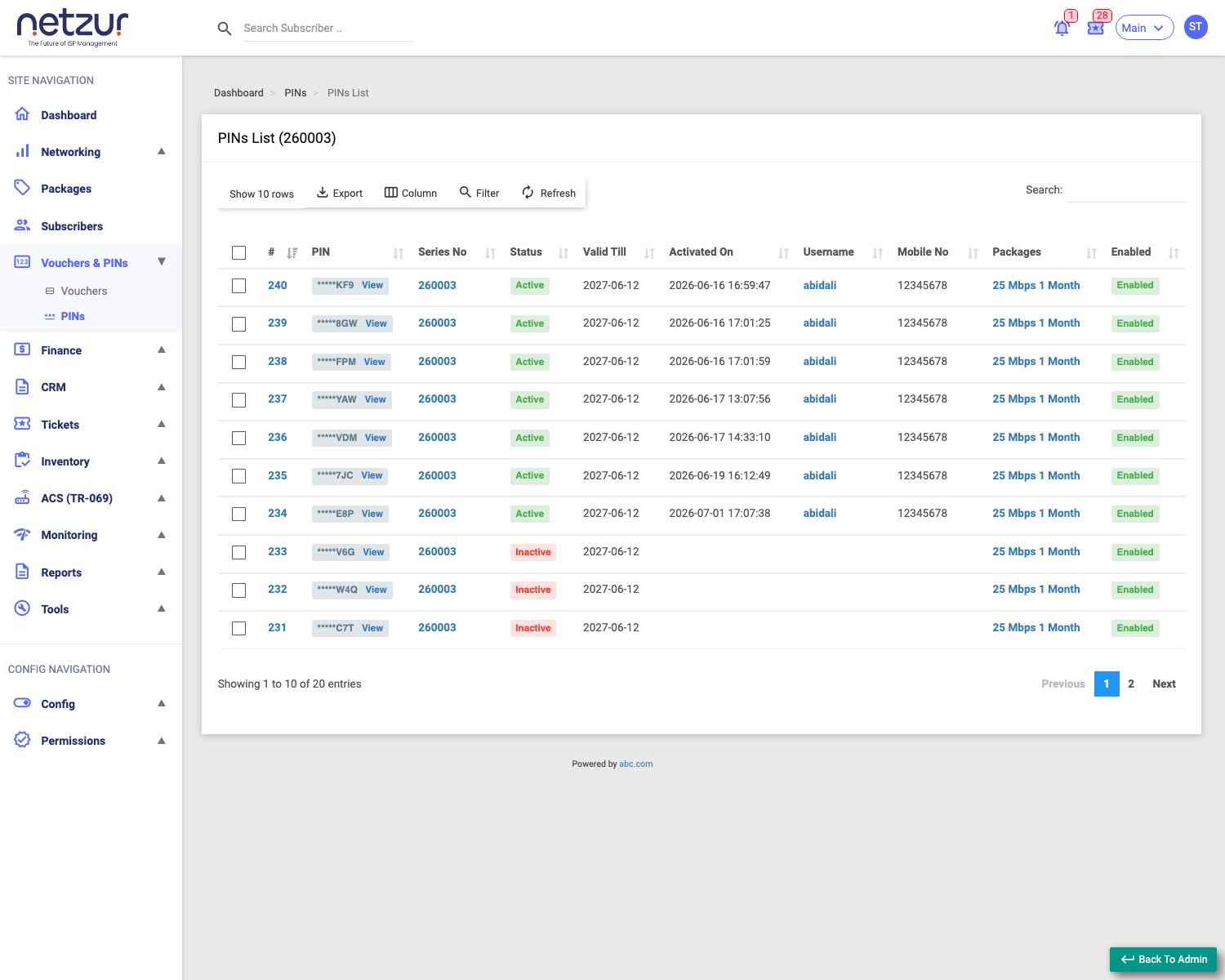
The PINs in a series
Each row is one PIN:
| Column | Meaning |
|---|---|
| # | Row number. |
| Pin | The code, masked (last 3 characters) with a View link to reveal it. |
| Series No | The batch it belongs to. |
| Status | Active (redeemed) or Inactive (unused). |
| Valid Till | Redeem-by date. |
| Activated On | When it was redeemed. |
| Username | The subscriber who redeemed it (links to their profile). |
| Mobile No | That subscriber's mobile. |
| Packages | The plan the PIN granted. |
| Enabled | Enabled / Disabled. |
Tick rows to reveal bulk actions: Delete, Enable, Disable individual PINs.
How a customer redeems a PIN
A PIN is redeemed by an existing subscriber, not set up by the ISP:
- The customer logs into their self-care portal or app.
- They enter the PIN code on the recharge screen.
- Netzur checks the PIN is unused, enabled and not expired, then applies its package to that subscriber (a plan renewal, a data top-up, or a speed booster, depending on the package type).
- The PIN is marked used — its Status becomes Active, and the subscriber's name, mobile and the date are recorded against it (visible in the list above).
Editing a series
Selecting the Series No opens the series editor (tabs: Config and Audit Timeline). Config shows read-only Total Pin and Total Active Pin counts, and lets you change settings that apply to every PIN in the series:
| Field | Description |
|---|---|
| Valid Till | New redeem-by date for all PINs. |
| Package | The plan all PINs grant. |
| Enabled | Enable/disable the whole series. |
Select Update to apply to the batch.
Important Notes
- The Username column is how you tell who used a PIN — handy when a customer disputes a recharge.
- Editing the series changes all its PINs; Enabled off disables the whole batch.
- A redeemed PIN can't be reused; unused PINs stop working after Valid Till.