The Voucher Profile
Overview
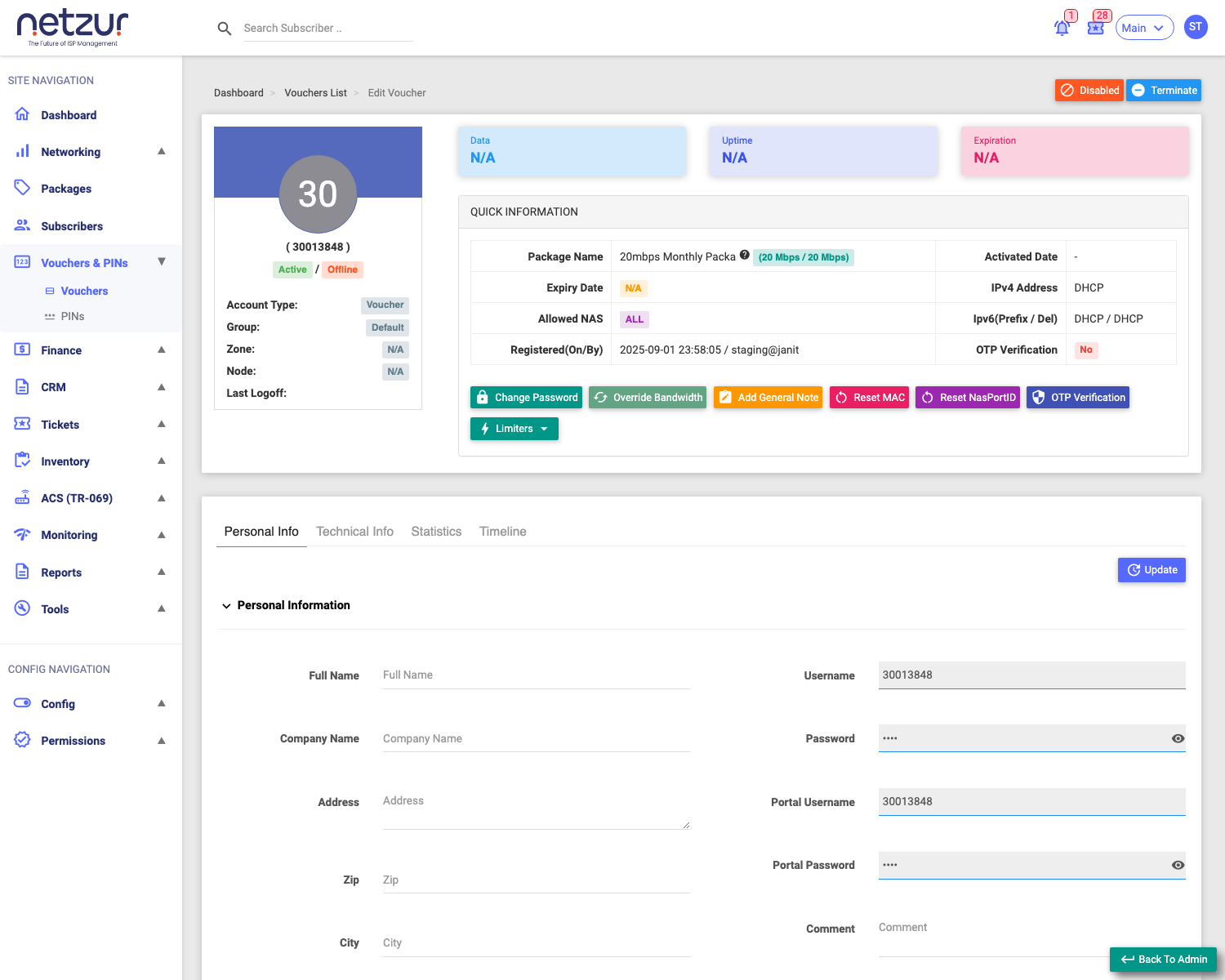
Opening a voucher's Username shows its profile — a lighter version of the subscriber profile. A voucher is an access account (account type Voucher), so it has the connection details and diagnostics of a subscriber, but not the billing side (no Finance, Documents/KYC, or Settings/billing tabs).
Required Permissions
- Voucher → Show to view; individual actions have their own permissions.
Navigation
Vouchers & PINs → Vouchers → (a series) Voucher List → (select a Username)
The header
Shows the voucher's code, Active/Inactive and online status, Account Type Voucher, Group/Zone/Node, and the Data / Uptime / Expiration remaining. The Quick Information table lists the package, activated date, expiry, IPv4/IPv6, allowed NAS and OTP verification. Top-right are Enable/Disable and Terminate.
The tabs
A voucher profile has four tabs (compared with a subscriber's nine):
| Tab | What it holds |
|---|---|
| Personal Info | Name/contact/address, and the read-only login Username/Password and Portal Username/Password. |
| Technical Info | MAC/NAS binding, login limit, NAS assignment, static IPv4/IPv6 — same as a subscriber's. |
| Statistics | Live session, cumulative usage, usage graph, session history — same as a subscriber's. Includes the Auth Log button. |
| Timeline | The voucher's change history (audit). |
A voucher has no Finance/Documents/Settings tabs — it isn't billed like a subscriber; its value was set when the series was created.
Actions
The header offers the same subscriber-style actions, scoped to this voucher:
- Change Password — login and/or portal password.
- Change Package — move the voucher to a different plan (when active).
- Override Bandwidth — custom speeds for a period.
- Add General Note — internal note.
- Reset MAC / Reset NasPortID — clear the device/port binding.
- OTP Verification — set the voucher's OTP-verified flag.
- Limiters menu — Set Data Limit, Set Uptime Limit, Change Expiry Date.
- Enable / Disable and Terminate (top-right).
These mirror the subscriber actions of the same name — see the Subscriber Actions for the dialog details; on a voucher they behave the same but without billing.
Important Notes
- The Username/Password are system-generated and read-only on Personal Info — change them with Change Password.
- Terminate ends the voucher; Disable pauses it.
- Because a voucher isn't billed, there's no recharge/invoice/wallet here — to give more service, use Change Package or the Limiters.